
Pairing: Logitech G G735 Wireless Gaming Headset User Manual
Content
Logitech G G735 Wireless Gaming Headset
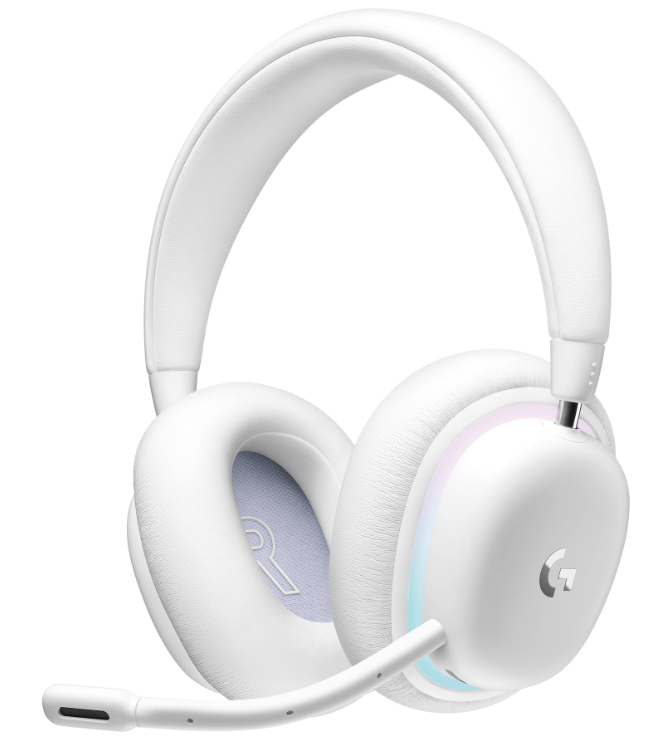
The Logitech G G735 Wireless Gaming Headset is a premium audio solution designed for gamers, streamers, and professionals who demand immersive sound, seamless connectivity, and all-day comfort. Part of Logitech’s Aurora Collection, this headset blends sleek aesthetics with advanced technology, making it a standout choice for PC, mobile, and console users. With a lightweight, plush design and customizable RGB lighting, the G735 delivers both style and substance.
Key benefits include dual wireless connectivity via LIGHTSPEED and Bluetooth, allowing you to connect to two devices simultaneously—perfect for gaming on your PC while staying reachable on your phone. The headset supports Dolby Atmos and Windows Sonic for spatial sound, ensuring every explosion, footstep, and voice chat is crystal clear. It's detachable Blue VOThe !CE microphone offers studio-quality voice capture, ideal for streaming and online meetings.
Designed for comfort, the G735 features a padded adjustable headband, rotatable ear cups, and soft memory foam, making it suitable for long sessions and even for those who wear glasses. The headset is available in a stylish White Mist colorway, with optional colored ear pads for personalization. Priced around $230, the Logitech G G735 Wireless Gaming Headset is widely available at major retailers and is a top pick for gamers seeking a versatile, high-performance headset.
Logitech G G735 Wireless Gaming Headset Specifications
- Driver Type: 40mm audio drivers
- Frequency Response: 20 Hz – 20 kHz
- Impedance: 38Ω (passive)
- Connectivity: LIGHTSPEED 2.4GHz wireless, Bluetooth, 3.5mm aux (cable not included)
- Battery Life: Up to 16+ hours with RGB lighting, up to 56 hours without
- Wireless Range: 20 meters (65 feet)
- Microphone: Cardioid, detachable, Blue VO!CE filters via Logitech G Hub
- Weight: 260g (9.2oz)
- Design: Circumaural (over-ear), rotatable ear cups, adjustable headband
- Software Support: Logitech G Hub for EQ, RGB, and microphone customization
- Compatibility: Windows 10/11, macOS, iOS, Android, consoles
- Warranty: 5-year limited warranty
The Logitech G G735 Wireless Gaming Headset outperforms many competitors in comfort and multi-device connectivity, offering a balanced blend of audio quality, battery life, and customization options.
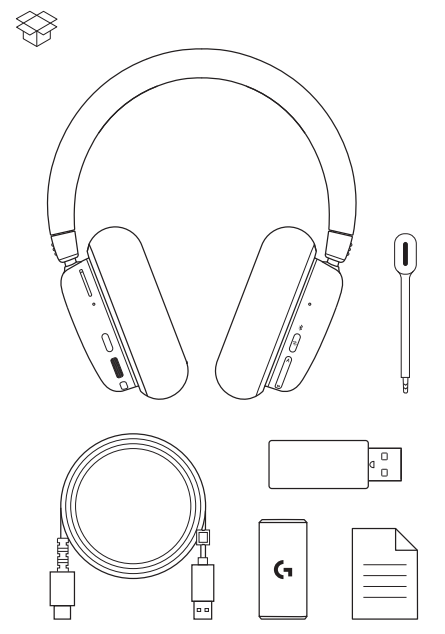
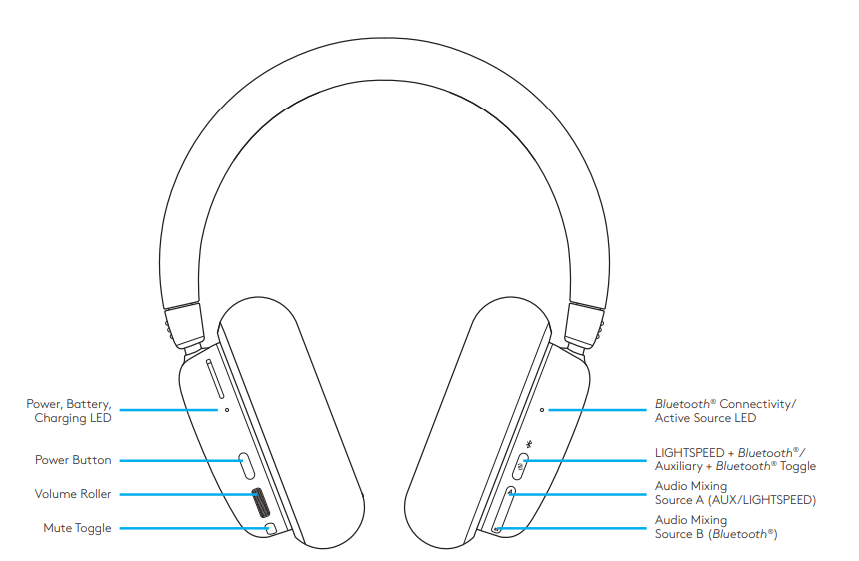
SETUP INSTRUCTIONS
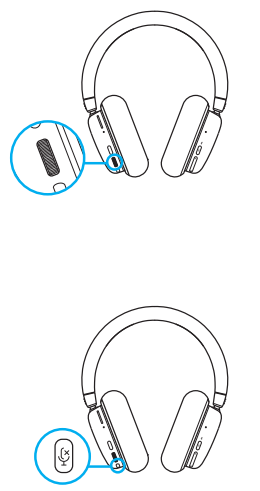
- Insert the microphone connector into the port on the left ear cup. It is designed to fit in one way.
- Turn on the G735 headset by pressing and holding the power button located on the left ear cup for 3 seconds.
- Insert the LIGHTSPEED receiver, with extender and cable, into the PC USB port. The receiver can be used without the extender and cable by inserting it directly into a USB port if desired.
- Download and install G HUB software on your PC/MAC for the best gaming experience (G HUB has an onboarding story for features).

BLUETOOTH® CONNECTIVITY
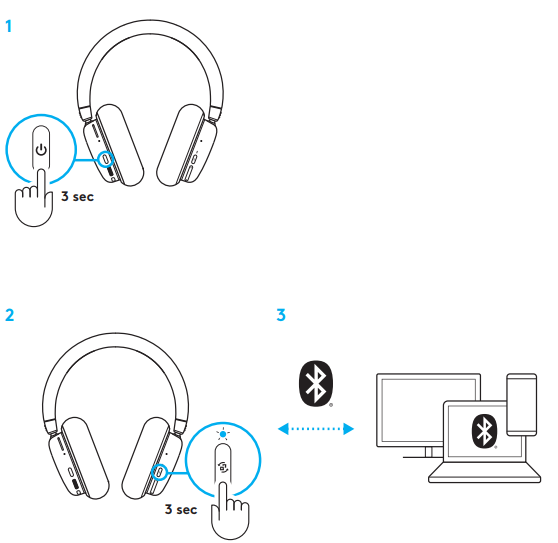
- Turn on the G735 headset by pressing and holding the power button for 3 seconds.
- Press and hold the Connectivity button for 3 seconds to initiate pairing mode. The blue light will flash quickly for up to 3 minutes.
- Follow the Bluetooth® connection for your device to pair with the headset.
Volume
Adjust volume with the roller on the left ear cup. This adjusts the headset’s total volume, not the volumes of your sources.
Mute/Unmute Microphone
- Press the mute button located below the volume on the left ear cup. This will mute the microphone.
- When muted, the cosmetic RGB will temporarily flash red.
- There will be a mute sound notification.
Audio Source Options
G735 can connect to and mix multiple audio sources at once:
- LIGHTSPEED audio
- Bluetooth® audio
- Auxiliary audio via 3.5 mm cable (not supplied)
- LIGHTSPEED + Bluetooth®
- Auxiliary + Bluetooth®
- Toggling LIGHTSPEED + Bluetooth®/
- Auxiliary + Bluetooth®
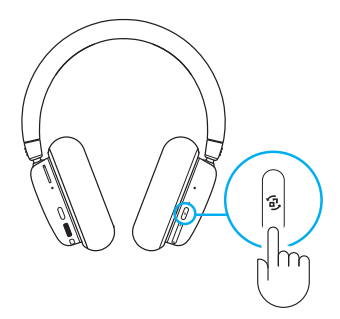
- After connecting to both LIGHTSPEED and AUX, toggle between LIGHTSPEED and AUX options by pressing the connectivity button on the right ear cup.
- When LIGHTSPEED is active, the LED light above the button will light up cyan for 5 seconds.
- When AUX is active, the LED light will light up white for 5 seconds.
- AUX is only available when a cable is connected.
Mixing LIGHTSPEED/AUX & Bluetooth®
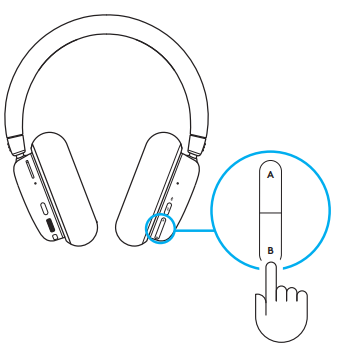
After connecting to 2 sources, LIGHTSPEED or AUX, and Bluetooth®:
- To adjust the source balance, press the up and down buttons on the right ear cup to paddle.
- Pressing up increases the active (LIGHTSPEED or AUX) source
- Pressing down increases the Bluetooth® source
- To reset to equal levels, press and hold both buttons for 3 seconds.
Logitech G G735 Wireless Gaming Headset Troubleshooting
Common issues with the Logitech G G735 Wireless Gaming Headset include audio dropouts, microphone not working, or pairing problems. For audio dropouts, ensure the USB receiver is close to the headset and free from interference. If the microphone is not detected, check the mute toggle and ensure it’s properly connected.
For pairing issues, reset the headset by holding the power button for 10 seconds. Update firmware via Logitech G Hub. If the headset won’t charge, try a different USB-C cable or port.
Preventive measures include regular cleaning of ear pads and storing the headset in a dry place. The 5-year warranty covers manufacturing defects; contact Logitech support for assistance. For help, visit Logitech Support or call 1-800-231-7717.
Pros and Cons of the Logitech G G735 Wireless Gaming Headset
Pros
- Excellent comfort for long gaming sessions
- Dual wireless connectivity (LIGHTSPEED + Bluetooth)
- Customizable RGB lighting and microphone filters
- Supports Dolby Atmos and Windows Sonic
- Detachable, high-quality microphone
- 5-year warranty for peace of mind
Cons
- Sound isolation could be better
- RGB lighting reduces battery life
- 3.5mm cable not included
- Priced higher than some competitors
The Logitech G G735 Wireless Gaming Headset offers great value for gamers who prioritize comfort, versatility, and audio quality, though it may not be the best for those needing strong noise isolation.
Customer Reviews: Logitech G G735 Wireless Gaming Headset
Users consistently praise the Logitech G G735 Wireless Gaming Headset for its comfort, sound quality, and multi-device connectivity. Many highlight the plush ear pads and lightweight design, making it ideal for extended use. The detachable microphone and Blue VO!CE filters receive positive feedback for clear voice chat and streaming.
Common complaints include average sound isolation and the need for a separate 3.5mm cable. The headset averages 4.5 out of 5 stars across major retailers, with users recommending it for gamers, streamers, and professionals. Frequent mentions include the ease of setup, long battery life, and stylish design.
Purchase recommendations suggest the Logitech G G735 Wireless Gaming Headset for those seeking a versatile, high-quality headset with excellent comfort and features.
Faqs
How do I set up the Logitech G G735 Wireless Gaming Headset for the first time?
What should I do if the Logitech G G735 Wireless Gaming Headset is not connecting to my PC?
Can I use the Logitech G G735 Wireless Gaming Headset with multiple devices simultaneously?
How can I optimize audio performance on the Logitech G G735 Wireless Gaming Headset?
Is the Logitech G G735 Wireless Gaming Headset compatible with both PC and Mac?
How do I charge the battery on the Logitech G G735 Wireless Gaming Headset and how long does it last?
How do I mute and unmute the microphone on the Logitech G G735 Wireless Gaming Headset?
What maintenance is needed for the Logitech G G735 Wireless Gaming Headset to keep it in good condition?
More logitech g manuals
- Pairing: Logitech G ASTRO A20 X Wireless Gaming Headset User Manual
- Setup: Logitech G G335 Wired Gaming Headset User Manual
- Pairing & Setup: Logitech G A50 X Wireless Headset User Manual
- Pairing & Setup: Logitech G A50 Wireless Headset Casque Sans Fil User Manual
- Setup: Logitech G G522 LightSpeed Headset User Manual
- Setup: Logitech G G535 LightSpeed Wireless Gaming Headset User Manual
Leave a Comment