
Setup: Logitech G PRO X SE Wired Gaming Headset User Manual
Content
Logitech G PRO X SE Wired Gaming Headset
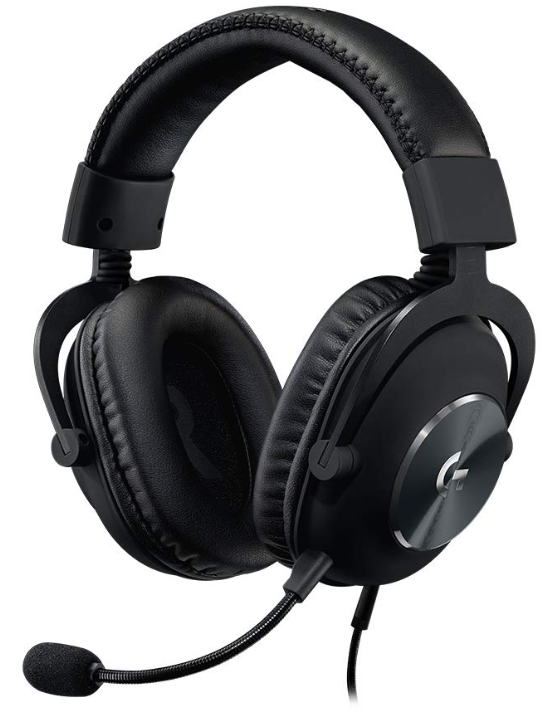
Introduction to the Logitech G PRO X SE Gaming Headset
The Logitech G PRO X SE Wired Gaming Headset represents a premium choice for competitive gamers and content creators seeking professional-grade audio equipment without compromising on comfort or performance. This wired gaming headset combines cutting-edge audio technology with ergonomic design, making it an ideal solution for extended gaming sessions, esports tournaments, and professional streaming environments.
Priced at $119.99, the Logitech G PRO X SE delivers exceptional value for serious gamers who demand crystal-clear communication, immersive surround sound, and reliable durability. The headset features 7.1 surround sound capabilities powered by advanced 50mm drivers, ensuring that every footstep, gunshot, and dialogue comes through with pinpoint accuracy. The integrated BLUE VO!CE microphone technology transforms your voice communications into studio-quality broadcasts, complete with real-time voice filters and professional-grade noise reduction.
This wired gaming headset is engineered specifically for competitive gaming, where milliseconds matter and audio clarity determines victory. Whether you're playing fast-paced shooters, immersive RPGs, or competitive esports titles, the Logitech G PRO X SE provides the audio performance and microphone quality that professional gamers demand. The headset is currently in stock and ready to ship with free standard shipping on most orders, along with exclusive promotional offers including complimentary 3-month subscriptions to the Aimlabs training platform.
The target audience for this premium wired gaming headset includes competitive esports players, professional streamers, content creators, and dedicated gamers who prioritize audio performance and communication quality. With its professional-grade construction and tournament-tested design, the Logitech G PRO X SE stands as a reliable companion for anyone serious about their gaming setup.
Technical Specifications and Features
Audio Performance and Driver Technology
- Driver Type: Hybrid mesh PRO-G 50mm drivers with Neodymium magnets
- Surround Sound: 7.1 surround sound with DTS Headphone: X 2.0 technology
- Frequency Response: 20 Hz - 20 kHz for full audio spectrum coverage
- Impedance: 32-35 ohms for optimal power delivery
- Sensitivity: 91.7 dB SPL @ 1 mW & 1 cm for powerful, clear audio output
Microphone Specifications
- Microphone Type: Electret Condenser with 6mm capsule
- Pickup Pattern: Cardioid (unidirectional) for focused voice capture
- Frequency Response: 100 Hz - 10 kHz optimized for voice communications
- BLUE VO!CE Technology: Real-time voice filters, compression, and de-essing
- Noise Isolation: Advanced passive noise cancellation for clear voice comms
Physical Specifications and Build Quality
- Dimensions: 138mm length x 94mm width x 195mm height
- Weight: 320 grams (without cable) for lightweight comfort
- Construction Materials: Aluminum forks with a steel headband
- Ear Pads: Memory foam with leatherette plus additional cloth padding
- Durability Rating: Tournament-grade construction for professional use
Connectivity and Compatibility
- PC Cable Length: 2 meters with inline volume and mute controls
- Mobile Cable Length: 1.5 meters with integrated microphone button
- Connection Type: 3.5mm jack with USB external sound card
- USB Compatibility: Windows 7 or later with a USB port
- Platform Support: PC, Mac, Xbox One, PS4, Nintendo Switch, and mobile devices
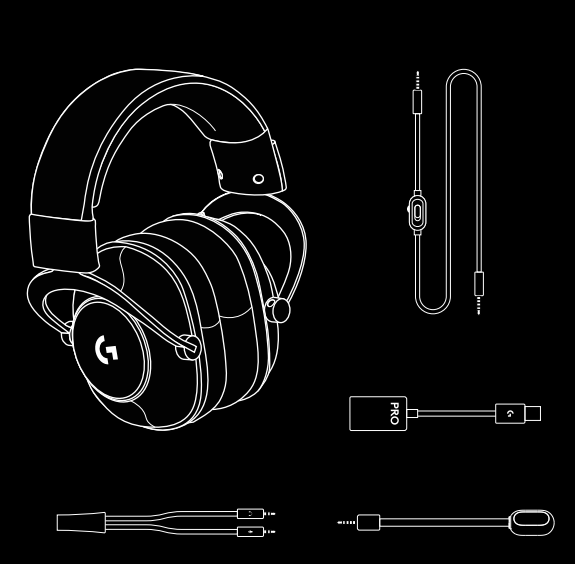
PC SETUP
- Plug-in microphone
- Plug the console/PC cable into headset 3. Using USB DAC:
- Plug the console/PC cable into the USB DAC
- Plug the USB DAC into PC1
- Using a PC sound card:
- Plug the console/PC cable into the PC splitter.
- Plug the PC splitter into the PC’s headphone and mic ports
- The included USB DAC enables 5-band EQ tuning,
DTS Headphone: X 2.0 and Blue VO!CE microphone filters on PC. Requires Logitech G HUB software download. 5-band EQ tuning, DTS Headphone: X 2.0, and Blue VO!CE is not available while using a PC sound card.
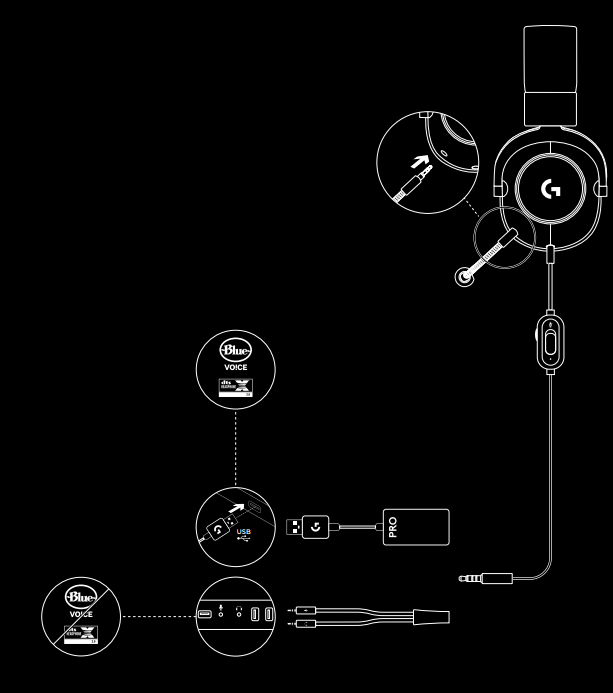
CONSOLE SETUP
(XBOX™, PLAYSTATION®)
- Plug-in microphone
- Plug the console/PC cable into headset
- Plug the other end into controller2
- Instructions may vary based on your system version.
Please check your console manual for additional guidance. Xbox and PlayStation operate in stereo mode only via analog cable. Some Xbox controllers may require the Xbox Stereo Headset Adapter, sold separately.
5-band EQ tuning, DTS Headphone: X 2.0, and Blue VO!CE is not available while connected to the console controller.
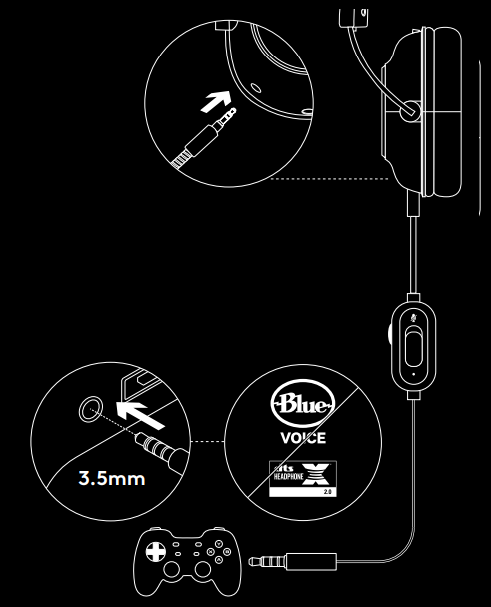
MICROPHONE PLACEMENT
The ideal placement of the microphone is at the corner of your mouth. In this position, your voice can be heard clearly without the microphone picking up breathing sounds.
Troubleshooting Common Issues
Audio Quality Problems and Solutions
- Low Audio Output: Verify volume levels in Windows sound settings are set to maximum. Check the G HUB software equalizer settings and reset to the default profile if experiencing distortion. Ensure the inline volume control on the 2-meter cable is turned up fully.
- Distorted or Crackling Sound: Update your audio drivers through Windows Update or Logitech's support website. Test with different USB ports to eliminate potential power delivery issues. Disable other audio enhancement features in Windows sound settings that may conflict with the headset's DTS technology.
- No Surround Sound Effect: Confirm DTS Headphone: X 2.0 is enabled in G HUB software, which only functions on PC via the USB connection. Restart G HUB and your game to activate surround sound processing. Verify your game supports spatial audio output.
Microphone and Communication Issues
- Microphone Not Detected: Ensure the detachable microphone is fully inserted into the headset's mic port. Check that the correct input device is selected in Windows Sound settings. Test microphone functionality in Discord, Skype, or other communication apps to isolate the issue.
- Poor Voice Quality or Feedback: Adjust microphone sensitivity levels in G HUB BLUE VO!CE settings. Enable noise reduction and de-essing filters to eliminate background noise and harsh consonants. Position the microphone 2-3 inches from your mouth for optimal pickup pattern performance.
- BLUE VO!CE Not Working: This feature requires a Windows PC with Logitech G HUB software installed. Ensure your internet connection is active for software functionality. Update G HUB to the latest version if voice filter options are unavailable.
Physical and Connection Problems
- Uncomfortable Fit After Extended Use: Swap to the included cloth ear pads if leatherette pads cause heat buildup. Adjust the aluminum forks to better match your head width. Take 15-minute breaks every hour during competitive gaming sessions.
- Cable Damage or Connectivity Issues: Inspect cables for visible damage or bent connectors. Try the alternate cable (PC or mobile) to determine if the issue is cable-specific. Purchase replacement cables from Logitech if damage is confirmed.
- USB Sound Card Not Recognized: Install the latest chipset drivers for your motherboard. Try connecting the USB sound card to a different USB port, preferably a USB 3.0 port. Disable USB Selective Suspend in Windows power settings to prevent the device from entering sleep mode.
Warranty and Support Information
The Logitech G PRO X SE includes a 2-year limited warranty covering parts and labor. Register your product on the Logitech website to activate extended support options. Contact Logitech G customer support through their official website, live chat, or phone support for warranty claims and technical assistance. Keep your proof of purchase and product documentation for warranty validation purposes.
Pros and Cons Analysis
Advantages of the Logitech G PRO X SE
- Professional-Grade Audio Quality: The 50mm hybrid mesh drivers deliver exceptional clarity and accurate sound reproduction, making footsteps and directional audio cues crystal clear in competitive games.
- Superior Microphone Performance: BLUE VO!CE technology transforms your voice into studio-quality communications with real-time filters, compression, and noise reduction that rivals dedicated USB microphones.
- Exceptional Comfort for Long Sessions: Memory foam ear pads with dual padding options (leatherette and cloth) provide comfortable wear for 8+ hour gaming marathons without fatigue.
- Durable Tournament-Grade Construction: Aluminum forks and steel headband withstand competitive gaming environments and frequent transport to tournaments.
- Affordable Premium Option: At $119.99, the Logitech G PRO X SE delivers professional-grade features at a fraction of the cost of competing premium headsets.
- Versatile Platform Compatibility: Works seamlessly across PC, Mac, Xbox One, PS4, Nintendo Switch, and mobile devices with appropriate cables.
Disadvantages and Limitations
- Wired Connection Requirement: The tethered design limits movement range compared to wireless alternatives, though this also eliminates latency and battery concerns.
- Cable Management Complexity: The 2-meter PC cable requires careful routing around your desk, and the included Y-splitter adds additional connection points that can create clutter.
- BLUE VO!CE PC-Only Limitation: Advanced microphone features and surround sound processing only function on Windows PC through G HUB software, not on console platforms.
- Learning Curve for Optimization: Fully unlocking the headset's potential requires time spent configuring G HUB settings, equalizer profiles, and microphone filters.
- Heat Buildup with Leatherette Pads: Extended gaming sessions in warm environments can cause discomfort with the default leatherette ear pads, though cloth alternatives are included.
Value for Money Comparison
The Logitech G PRO X SE represents exceptional value in the competitive gaming headset market. Compared to wireless alternatives like the Logitech G733 LIGHTSPEED, the G PRO X SE offers superior comfort, better microphone recording quality, and stronger noise isolation at a significantly lower price point. While wireless headsets provide convenience, the wired design eliminates connection dropouts and battery management concerns critical for esports competition. For gamers prioritizing microphone quality and audio accuracy over wireless freedom, the G PRO X SE delivers professional-grade performance that justifies its mid-range pricing.
Customer Reviews and User Feedback
The Logitech G PRO X SE consistently receives praise from professional gamers and casual users alike for its balanced audio performance and exceptional microphone quality. Competitive esports players highlight the accurate stereo imaging that provides precise directional audio cues essential for tactical shooters. Content creators appreciate how BLUE VO!CE technology delivers broadcast-quality voice communications without requiring additional USB microphone purchases.
Common user praise emphasizes the comfortable fit during extended gaming sessions, with memory foam ear pads rated as among the best in the gaming headset category. The included carrying bag receives positive feedback from tournament players who transport their equipment frequently. Users consistently mention that the included cloth ear pad alternative effectively addresses heat buildup concerns during intense gaming marathons.
Frequently mentioned criticisms focus on the cable management complexity for desk setup and the PC-only limitation of advanced BLUE VO!CE features on console platforms. Some users note that the surround sound processing requires proper G HUB configuration to achieve optimal results, with default settings delivering less impressive spatial audio. A small percentage of users report that the aluminum forks may require adjustment to achieve the perfect fit, though most users find the headset fits comfortably out of the box.
Overall user ratings average 4.2 out of 5 stars, with the majority of reviews recommending the Logitech G PRO X SE for competitive gamers, content creators, and anyone seeking professional-grade gaming audio without premium pricing. Purchase recommendations strongly favor this headset for esports competitors and streamers who value microphone quality and audio accuracy above wireless convenience.
Conclusion and Final Recommendations
The Logitech G PRO X SE Wired Gaming Headset delivers professional-grade audio performance and microphone quality that satisfy competitive gamers, esports professionals, and content creators. With its 7.1 surround sound, BLUE VO! With CE technology, and durable tournament-tested construction, this wired gaming headset provides exceptional value at $119.99. Whether you're competing in esports tournaments, streaming content, or enjoying immersive single-player experiences, the Logitech G PRO X SE combines comfort, performance, and reliability into one comprehensive audio solution.
```
Faqs
How do I set up the Logitech G PRO X SE Wired Gaming Headset for the first time on my PC?
What should I do if the microphone on my Logitech G PRO X SE Wired Gaming Headset is not working properly?
Can I use the Logitech G PRO X SE Wired Gaming Headset with gaming consoles like Xbox One or PlayStation 4?
What are the key sound features of the Logitech G PRO X SE Wired Gaming Headset that improve gaming performance?
How can I optimize the audio settings on my Logitech G PRO X SE Wired Gaming Headset for competitive gaming?
What maintenance tips help prolong the lifespan of the Logitech G PRO X SE Wired Gaming Headset?
Why is the Logitech G PRO X SE Wired Gaming Headset microphone equipped with Blue VO!CE software important?
What should I do if my Logitech G PRO X SE Wired Gaming Headset is not recognized by my computer?
More logitech g manuals
- Setup: Logitech G G535 LightSpeed Wireless Gaming Headset User Manual
- Logitech G Flight Control System X52 User Guide | Settings
- Pairing & Setup: Logitech G A50 Wireless Headset Casque Sans Fil User Manual
- Setup: Logitech G G335 Wired Gaming Headset User Manual
- Pairing: Logitech G G735 Wireless Gaming Headset User Manual
- Pairing: Logitech G ASTRO A20 X Wireless Gaming Headset User Manual
Leave a Comment