
Motorola Moto-G Stylus Smartphone 2020 User Manual
Content
Introduction to the Motorola Moto G Stylus Smartphone 2020
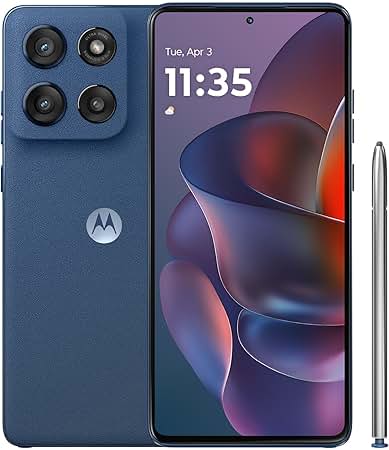
The Motorola Moto G Stylus Smartphone 2020 is a budget-friendly Android phone designed for users who want a larger display, reliable everyday performance, and the convenience of a built-in stylus. With its 6.4-inch Full HD+ screen, Snapdragon 665 processor, and 128GB of storage, it delivers a practical balance of productivity and entertainment for students, note-takers, casual gamers, and mobile photographers.
One of its biggest selling points is the integrated stylus, which makes it easy to sketch, sign documents, take handwritten notes, and navigate the interface with precision. The triple-camera setup also adds value, giving users a 48MP main camera, ultra-wide lens, and macro lens for flexible shooting in different situations. A 4,000mAh battery helps the phone last through a full day of normal use, while Android 10 provides a clean and familiar software experience.
At launch, the Motorola Moto G Stylus Smartphone 2020 was priced at around $300, and it was widely sold through major retailers and Motorola’s own store. Today, availability may vary by region and seller, but it remains a popular choice for shoppers seeking an affordable stylus phone with solid core features. It is especially appealing for anyone who wants a larger-screen device without paying premium flagship prices.
Specifications of the Motorola Moto G Stylus Smartphone 2020
- Display: 6.4-inch IPS LCD, 2300 x 1080 resolution, about 399 ppi
- Processor: Qualcomm Snapdragon 665, octa-core architecture
- RAM: 4GB
- Storage: 128GB internal storage, expandable via microSD
- Rear Cameras: 48MP main, 16MP ultra-wide, 2MP macro
- Front Camera: 16MP selfie camera
- Battery: 4,000mAh non-removable battery
- Charging: 10W wired charging via USB-C
- Operating System: Android 10, upgradeable to Android 11 on supported units
- Build: Glass front, plastic back, aluminum frame
- Dimensions: 158.6 x 75.8 x 9.2 mm
- Weight: 192 g
- Connectivity: Wi-Fi, Bluetooth, GPS, USB-C, 3.5mm headphone jack
In performance, the Moto G Stylus 2020 sits in the midrange category, offering smooth everyday use rather than flagship-level speed. Compared with similar budget phones from the same period, it stands out for the stylus, larger storage, and versatile camera system, making it a stronger choice for productivity-focused buyers than many basic rivals.
Detailed Description of the Motorola Moto G Stylus Smartphone 2020
The Motorola Moto G Stylus Smartphone 2020 is built around practical everyday use. The stylus is stored inside the phone body and can be removed quickly for writing notes, editing screenshots, drawing, or selecting small on-screen elements. This makes the phone useful for people who prefer handwriting input or need a quick tool for work and school tasks.
The 6.4-inch Full HD+ display is large enough for reading, watching videos, browsing the web, and multitasking comfortably. The Snapdragon 665 processor is designed for standard daily use such as messaging, social media, navigation, streaming, and light gaming. The polycarbonate back and aluminum frame give the phone a sturdy feel without making it overly heavy.
Real-world use cases include signing PDFs, marking up photos, sketching ideas, and taking class notes on the go. The camera system offers flexibility for landscapes, close-up shots, and social content. Overall, the user experience feels simple, efficient, and approachable, especially for first-time smartphone buyers and users who want a reliable Android device with extra creative functionality.
Setup Guide for the Motorola Moto G Stylus Smartphone 2020
To set up the Motorola Moto G Stylus Smartphone 2020, begin by inserting your Nano-SIM card and, if needed, a microSD card for additional storage. Power on the device by holding the side button, then follow the on-screen setup instructions to select your language, connect to Wi-Fi, and sign in with your Google account.
During setup, you can restore data from a previous Android phone, configure screen lock options such as PIN, pattern, or fingerprint, and choose privacy settings. After setup, test Bluetooth pairing with earbuds or a smartwatch, and confirm that Wi-Fi calling, hotspot, or mobile data functions work properly if your carrier supports them.
For safety, avoid using the phone with wet hands and do not force the stylus into its slot if it is misaligned. Keep the device away from extreme heat and use only compatible chargers and cables. If the phone does not power on, charge it for at least 20 minutes before trying again. If connectivity fails, restart the phone and recheck SIM placement, Wi-Fi credentials, and Bluetooth visibility.
Troubleshooting the Motorola Moto G Stylus Smartphone 2020
Common issues with the Motorola Moto G Stylus Smartphone 2020 usually involve battery drain, slow performance, Bluetooth pairing failures, or app crashes. If the battery seems to drain too quickly, reduce screen brightness, close unused apps, turn off location services when not needed, and check for software updates.
If the phone becomes slow, clear recent apps, free up storage space, and restart the device. For camera problems such as black screens or app freezes, clear the camera app cache and update the software. If you see SIM-related warnings, remove the SIM tray, reseat the card, and make sure the carrier network is supported.
There are no widely used public error codes specific to this model, but general Android alerts often indicate storage, network, or app permission problems. Preventive care includes regular updates, avoiding overheating, and backing up data. For support, Motorola’s official support channels, retailer warranty services, and carrier assistance are the best options, depending on where the phone was purchased.
Pros and Cons of the Motorola Moto G Stylus Smartphone 2020
Pros
- Built-in stylus adds real productivity value for notes, drawings, and editing
- Large 6.4-inch Full HD+ display works well for media and reading
- 128GB storage is generous for a budget phone
- Triple-camera setup provides more flexibility than many entry-level phones
- Good value for money at its original $300 price point
- Includes a 3.5mm headphone jack and expandable storage
Cons
- Snapdragon 665 is adequate, but not ideal for heavy gaming or demanding multitasking
- 10W charging is slow by modern standards
- Plastic materials feel less premium than glass-and-metal competitors
- Camera quality is solid in daylight but less impressive in low light
- Stylus is useful, but not as advanced as premium pen-based phones
Compared with alternatives like the Moto G Power of the same era, the Moto G Stylus is better for productivity and creative input, while the G Power typically wins on battery life. For buyers who want a pen-equipped phone without flagship pricing, the Motorola Moto G Stylus Smartphone 2020 remains a strong budget-minded option.
Customer Reviews of the Motorola Moto G Stylus Smartphone 2020
Customer feedback for the Motorola Moto G Stylus Smartphone 2020 is generally positive, with many users praising the stylus, large display, and storage capacity. A common rating pattern is around 4 out of 5 stars, especially among buyers who value note-taking and media consumption.
Typical praise includes comments like, “The stylus makes everyday tasks much easier,” and “The screen is perfect for videos and reading.” Common complaints mention slow charging, average low-light camera performance, and occasional lag during heavier use. Some users also wish the phone had faster performance and a more premium finish.
Overall, it is a good purchase recommendation for students, casual users, and anyone looking for an affordable stylus smartphone. Buyers who prioritize speed or top-tier photography may want to compare it with newer midrange models, but for practical everyday use, it offers solid value and a unique feature set.
Faqs
How do I set up motorola Moto-G Stylus Smartphone 2020 for the first time and transfer data from my old phone?
What should I do if my motorola Moto-G Stylus Smartphone 2020 is running slowly or apps keep freezing?
Does motorola Moto-G Stylus Smartphone 2020 support a microSD card, and how can I use it to expand storage?
How do I use the built-in stylus on the motorola Moto-G Stylus Smartphone 2020 effectively?
Why is the battery on my motorola Moto-G Stylus Smartphone 2020 draining too fast, and how can I improve it?
How do I fix fingerprint sensor problems on motorola Moto-G Stylus Smartphone 2020?
Which accessories and chargers are compatible with motorola Moto-G Stylus Smartphone 2020?
How should I clean and protect motorola Moto-G Stylus Smartphone 2020 for long-term use?
More motorola manuals
- Motorola Moto Watch Fit XT2541-1 User Manual
- How to Use: Motorola Wireless Car Adapter MA1 User Manual
- Setup: Motorola Corded Telephone Machine CT610 User Guide
- Motorola HD Connect Video Camera PIP1610-4 User Guide
- Motorola Video Baby Monitor MBP36XL-4 User Guide
- Motorola Moto Smart Phone G5S Plus Instruction Manual
Leave a Comment