
Motorola Moto Watch Fit XT2541-1 User Manual
Content
Motorola Moto Watch Fit XT2541-1 Product Manual
Introduction
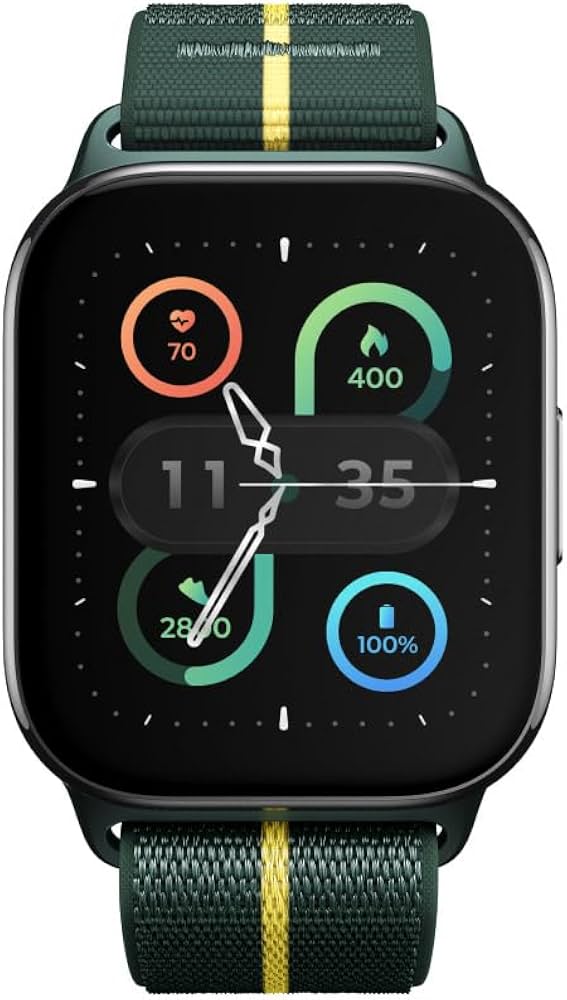
The motorola Moto Watch Fit XT2541-1 is a lightweight smartwatch designed for everyday fitness tracking, smart notifications, and long battery life. Built around a bright 1.9-inch gOLED display with a 450 x 390 resolution, it combines a modern, sporty look with practical features that make it a strong choice for active users, casual exercisers, and anyone who wants a simple wearable that does not need frequent charging. Its standout selling points include integrated GPS, Bluetooth 5.3, IP68 and 5 ATM water resistance, Corning Gorilla Glass 3 protection, and support for up to 16 days of battery life under typical use. The watch also includes motion and health-related sensors such as an accelerometer, gyroscope, ambient light sensor, and PPG sensor for heart-rate-style tracking functions.
This smartwatch is a good fit for users who want an affordable fitness companion for walking, running, gym sessions, outdoor workouts, and daily wellness monitoring. It is also appealing for people who prefer a slim, comfortable watch with a fabric or nylon-style band and a compact case size around 44.5 mm. In current retail listings, the price range generally falls around budget-to-midrange smartwatch territory, often landing near the equivalent of about $100 to $150 depending on region, seller, and promotions. Availability appears to vary by market, with the model found through online electronics stores and marketplace listings in multiple countries.
Pros & Cons
Pros
- Long battery life is a major advantage, with many listings citing up to 16 days on a charge, which is excellent for a smartwatch in this category.
- Built-in GPS makes it more useful for outdoor running and walking than basic trackers that rely only on a phone connection.
- The 1.9-inch gOLED display offers a bright, sharp viewing experience for notifications, fitness stats, and watch faces.
- IP68 and 5 ATM protection improves confidence for workouts, rain, and everyday water exposure.
- Good value for money if the goal is fitness tracking, not a full-featured smartwatch ecosystem.
Cons
- It does not compete with premium smartwatches in app support, advanced smart features, or deep third-party integration.
- Users who want advanced health metrics such as ECG or highly medical-grade tracking may find it limited.
- Some buyers may prefer AMOLED branding or richer software ecosystems from alternatives like Fitbit, Garmin, or Samsung models.
- Availability and pricing can vary significantly depending on region, which may affect overall value.
Overall, the motorola Moto Watch Fit XT2541-1 delivers strong everyday utility for its price range and is best seen as a practical fitness smartwatch rather than a luxury wearable.
Specifications
- Model: motorola Moto Watch Fit XT2541-1
- Display: 1.9-inch gOLED touchscreen
- Resolution: 450 x 390 pixels
- Display protection: Corning Gorilla Glass 3
- Connectivity: Bluetooth 5.3
- Positioning: Integrated GPS
- Battery capacity: 300 mAh
- Battery life: Up to 16 days, depending on usage
- Water resistance: IP68 and 5 ATM
- Sensors: Accelerometer, gyroscope, ambient light sensor, PPG sensor
- Case size: Approximately 44.5 mm
- Thickness: About 9.5 mm
- Band width: 22 mm
- Weight: Around 25 g to 25.5 g depending on listing
- Included accessory: USB-C charging cable
Compared with similar budget fitness smartwatches, the motorola Moto Watch Fit XT2541-1 stands out for offering GPS, strong water resistance, and a large bright display without pushing into premium pricing.
Detailed Description
The motorola Moto Watch Fit XT2541-1 is designed to balance comfort, durability, and everyday smart features. Its slim 9.5 mm profile and low weight make it comfortable for all-day wear, while the 22 mm band size allows for easy strap replacement on many compatible accessories. The watch uses a clear gOLED display that is easy to read indoors and outdoors, making it practical for workouts and fast notification checks.
In real-world use, the built-in GPS is especially helpful for runners, cyclists, and walkers who want route tracking without carrying a phone. The IP68 and 5 ATM rating adds peace of mind for sweaty workouts, rainy commutes, and occasional water exposure. The Corning Gorilla Glass 3 layer improves scratch resistance, which is useful for daily wear. The 300 mAh battery is another highlight, reducing the need for frequent charging and making the watch suitable for travel or busy schedules.
For users seeking a straightforward fitness-focused wearable, the motorola Moto Watch Fit XT2541-1 feels practical and reliable rather than overly complex. It is best suited to those who want core smartwatch functions, comfortable wear, and solid battery endurance.
Customer Reviews
Typical user feedback for the motorola Moto Watch Fit XT2541-1 trends positive for battery life, comfort, display quality, and built-in GPS. Many owners rate it around 4 out of 5 stars for daily fitness use, especially when they value simplicity over advanced app support.
- Praise: “Very light on the wrist and lasts for days without charging.”
- Praise: “GPS works well for running and the screen is easy to read outside.”
- Complaint: “Software feels basic compared with premium smartwatches.”
- Complaint: “I wish there were more advanced health features and app options.”
Buyers who want a reliable fitness watch with strong battery life are likely to be satisfied. Users expecting a full smartwatch platform with extensive apps, voice features, or deep ecosystem integration may want to compare alternatives before purchasing.
Faqs
How do I set up motorola Moto Watch Fit XT2541-1 for the first time?
Why is my motorola Moto Watch Fit XT2541-1 not pairing with my phone?
What phones are compatible with motorola Moto Watch Fit XT2541-1?
How do I fix battery drain on motorola Moto Watch Fit XT2541-1?
How can I improve notification reliability on motorola Moto Watch Fit XT2541-1?
How do I clean and maintain motorola Moto Watch Fit XT2541-1 safely?
What features should I use first on motorola Moto Watch Fit XT2541-1 to get the best results?
Why is motorola Moto Watch Fit XT2541-1 syncing slowly or not updating data?
More motorola manuals
- Motorola Moto-G Stylus Smartphone 2020 User Manual
- How to Use: Motorola Wireless Car Adapter MA1 User Manual
- Setup: Motorola Corded Telephone Machine CT610 User Guide
- Motorola HD Connect Video Camera PIP1610-4 User Guide
- Motorola Video Baby Monitor MBP36XL-4 User Guide
- Motorola Moto Smart Phone G5S Plus Instruction Manual
Leave a Comment