
Setup & Pairing: Peztio Dash Cam 1080P High Definition Wide Angle Lens User Manual
Content
Peztio Dash Cam 1080P High Definition Wide Angle Lens
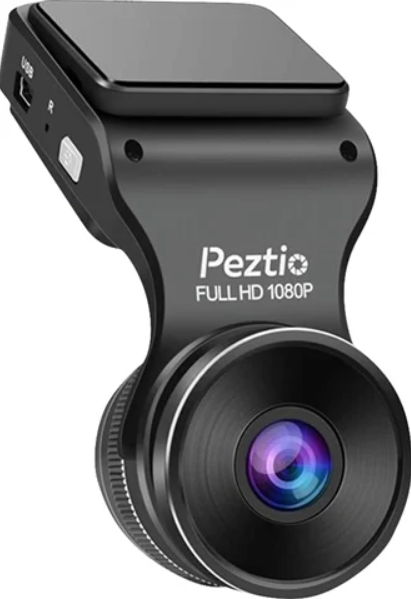
Introduction to Peztio 1080P Dash Cam
The Peztio Dash Cam 1080P High Definition Wide Angle Lens represents an affordable yet feature-rich solution for vehicle security and accident documentation. This budget-friendly dash camera delivers Full HD 1080p recording capabilities with a 170-degree ultra-wide viewing angle, making it an ideal choice for drivers seeking comprehensive road coverage without breaking the bank. Whether you're a daily commuter, ride-share driver, or simply want peace of mind on the road, this Peztio 1080P dash cam offers exceptional value for money.
The Peztio Dash Cam 1080P is engineered to capture critical moments with clarity and detail. Its compact design fits seamlessly on your windshield, while intelligent features like G-sensor collision detection and seamless loop recording ensure you never miss important footage. With a 3-inch LCD and intuitive controls, this Full HD wide-angle lens dash camera makes reviewing and managing your recordings straightforward and convenient. The device typically retails between $50-$80, making it one of the most accessible high-definition dash cameras on the market.
This Peztio 1080P High Definition Wide Angle Lens dash cam is particularly suited for budget-conscious consumers, new drivers building confidence, fleet managers monitoring multiple vehicles, and anyone seeking reliable accident evidence. The combination of Full HD recording, wide-angle lens coverage, and essential safety features makes this Peztio dash camera a practical investment in your vehicle's security. Available through major retailers,, including Amazon, this affordable dash cam has garnered positive reviews from users appreciating its balance of performance and price.
PACKAGE CONTENT
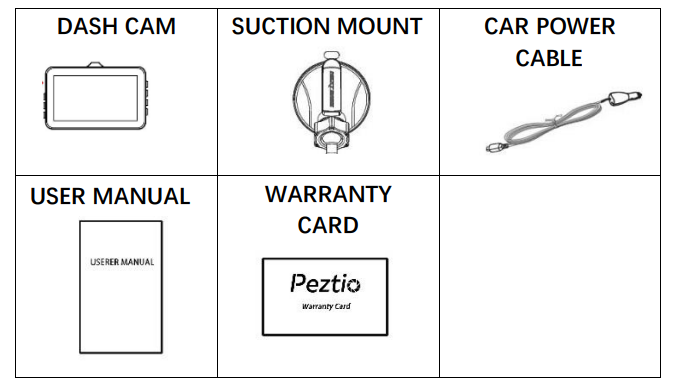
If you find that there are missing accessories in the package, please contact our customer support email immediately.
Technical Specifications of Peztio 1080P Dash Cam
PRODUCT SPECIFICATION
- Display Screen: 3.0-inchIPS Screen G,, sensor built in
- Resolution: FHD 1080P/720P/480P
- Sensor: 170 Degree Ultra WideAnAngleens
- Language: English, German, Japanese, etc.
- File Format: AVI
- Video Format: M-JPEG
- Picture Format: JPEG
- Microphone: Support
- Built-in Speaker: Support
- USB Function: USB Disk/PC camera
- Power interface: 5V/1A
- Battery: Built-in 2 00mah
Video Recording Capabilities:
- Resolution: Full HD 1080p (1920x1080)
- Frame Rate: 30fps for smooth video playback
- Viewing Angle: 170-degree ultra-wide-angle lens
- Video Format: MOV and H.264 codec
- Lens Type: Ultra-high resolution wide-angle lens
- Image Sensor: 3-megapixel camera
Display and Interface:
- Screen Size: 3-inch LCD
- Display Type: Color LCD screen for easy navigation
- Built-in Microphone: Yes, for audio recording
- Intuitive Menu: Easy-to-use on-screen controls
Storage and Memory:
- Internal Memory: 64MB built-in storage
- Expandable Storage: Supports microSD cards up to 32GB
- Loop Recording: Automatic overwrite of oldest files when storage is full
- File Format: MOV and H.264 compatible
Safety and Detection Features:
- G-Sensor: Automatic collision detection and lock
- Wide Dynamic Range (WDR): Enhanced visibility in challenging lighting
- Seamless Loop Recording: Continuous recording without gaps
- Auto Power On/Off: Automatic ignition-based activation
Power and Connectivity:
- Power Input: 1 Amp, 5 Volt
- Built-in Battery: Yes, for brief operation
- Wired Installation: Optional hardwiring capability
MAIN FUNCTION
- Loop Record
The Loop recording video can be set to the timing of 1 min, 3min,, or 5 min. It will save the vital videos in case e losing or damaging the videos when an accident occurs, the TF card slips out, or the power connection is loosening. - Emergency Record
Motion Detection: When the Motion Detection is on, it will detect whether there is a moving object, and the recording will auto on if it finds a moving object.
Gravity Sensor: When there is a severe bump in vehicles, the video will be locked and will not be deleted by cyclic recording.
MULTIPLES MODES
There are 3 modes of camera operation - Video, Photo,, and Playback.
- Video Mode: The default mode when the camera is turned on, for video recording.
- Photo Mode: Allows you to take still photographs.
- Replay Mode: Allows you to view recorded video or photographs on the DASH CAM IPS screen.
PRODUCT STRUCTURE
- Microphone
- Reset point
- Mount socket
- 3-inch screen
- Power socket
- HDMI slot
- TF card slot
- Up direction button
- Menu button
- Down direction button
- OK button
- Mode button
- Lock button
- Power button
- Charging indicator light
- Recording indicator light

INSTALLATION GUIDANCE
INSTALL THE FRONT CAMERA
WARNING: Please choose a good quality branded SD card between 8GB and 32GB (Class 10 or UHS type 1) and format the card within the setup menu before use. Please insert the card in the right direction.
Insert the TF card as shown above. Please gently insert the TF card into the slot.

- Mount the front camera
- Clean the front windscreen.
- Assemble the suction mount and front camera together.
Remove the e protective plastic film from the suction pad, push the suction cup onto the inner windshield in a suitable position (Won't shade your vision while driving), and press the suction bracket handle to ensure that it is well fixed.

- Connect the original charger to the cigarette lighter.
- Route the cables through the top ceiling and the A-pillar so that it does not interfere with driving.

FUNCTION INTRODUCTION
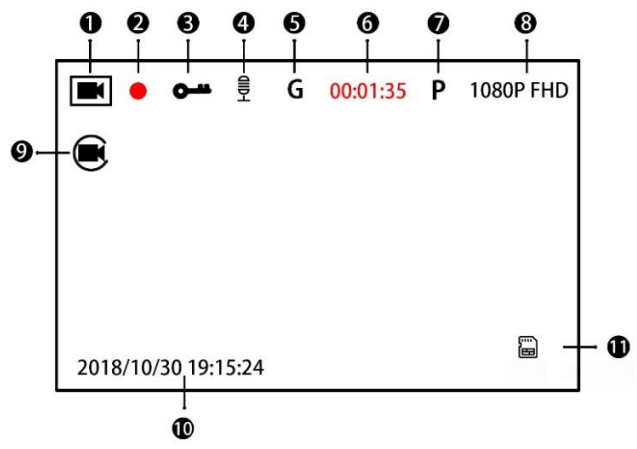
- Video/Photo/Replay Mode
Press the Mode Button to switch the video/photo/replay mode. If you are recording, press the OK button to stop recording first.- In video mode, press OK to start/stop recording.
- In photo mode, press OK to shoot photos.
- In replay mode, press the OK button to play/pause the video, and press the Up & Down direction button to switch videos.
- Recording point
Red point will keep flashing while recording. - Lock sign
With the lock sign, the current file will be locked and can’t be overwritten. When the G-sensor detects a collision, it will lock the current file. You can also lock the file manually by pressing the lock button on the camera. - Microphone
With the microphone sign, the audio will be recorded.
You can adjust the microphone on/off in the video setting menu. - G-sensor
When the G-sensor detects a collision, it will lock the current file. You can adjust the sensitivity of the G-sensor between off/high/medium/low in the video setting menu. Different kind of sensitivities requires different gravity to activate the G-sensor. - Recording time of the current video
- Parking mode
With this mode on, it will automatically begin to record when the vehicle manifests shake after the vehicle key is off. You can adjust the parking mode on/off in the system settings menu. - Current Video resolution
You can change the current video resolution between 1080P and 720P in the video settings menu.
The higher the resolution you set, the clearer and larger the video it captures. - Loop recording
Automatically overwrite the oldest files without locking.
You can change the video length of the loop recording between 1mi1minnns in the video setting menu. - Current date
The date will be shown on the video if you turn the date stamp on. - TF card installed
Troubleshooting Guide for Peztio 1080P Dash Cam
Common Issues and Solutions:
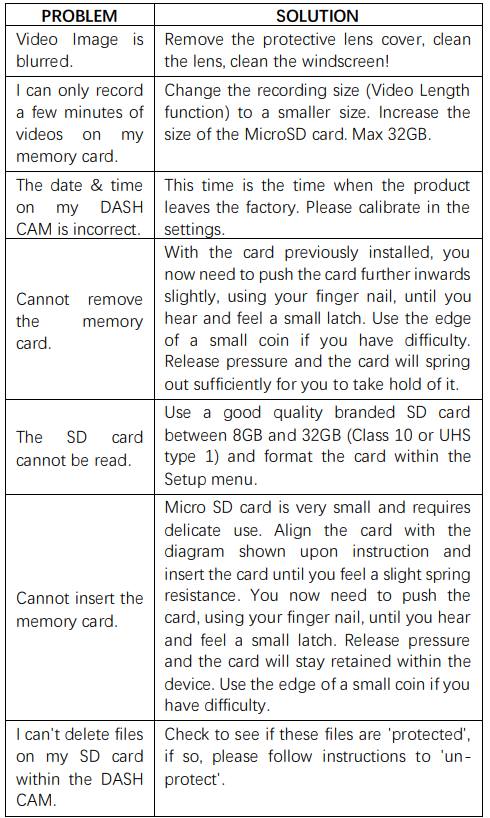
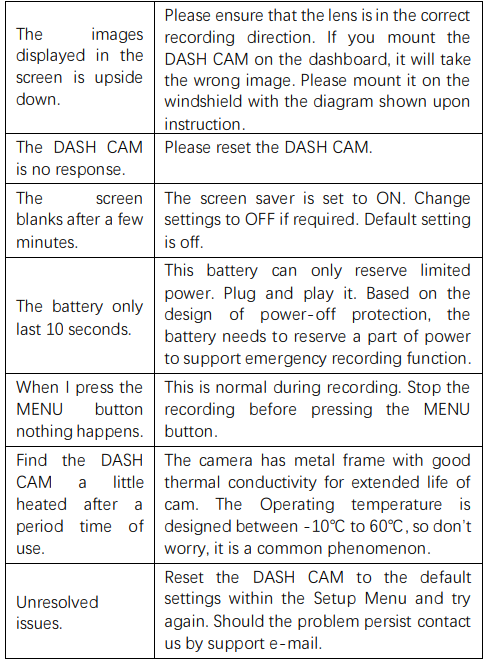
- No Video Recording: Ensure the microSD card is properly inserted and formatted. Check that the Peztio dash cam has sufficient power and the ignition is on. Verify the memory card isn't full by checking available storage space. If problems persist, try reformatting the card using the dash cam's menu.
- Poor Video Quality: Clean the wide-angle lens with a soft, lint-free cloth to remove dust or condensation affecting the 1080P recording. Ensure adequate lighting for daytime recording. Check that WDR (Wide Dynamic Range) is enabled for better performance in high-contrast situations. Verify the microSD card has sufficient write speed for stable Full HD recording.
- G-Sensor Not Detecting Collisions: Access the settings menu and confirm the G-sensor sensitivity is appropriately configured. Ensure the Peztio dash cam is securely mounted and level on the windshield. Test the collision detection by gently tapping the vehicle to verify the lock function works properly.
- Screen Display Issues: Power cycle the Peztio 1080P dash cam by disconnecting and reconnecting the power cable. Check for loose connections between the camera and the power source. If the 3-inch LCD screen remains unresponsive, perform a factory reset through the menu options.
- Loop Recording Malfunction: Verify loop recording is enabled in settings. Ensure the microSD card has adequate space and isn't corrupted. Format the storage card using the dash cam's built-in formatting tool to reset recording cycles.
- Warranty and Support: Peztio offers standard manufacturer warranty coverage for defects in materials and workmanship. Contact Peztio customer service through their official website or authorized retailers for warranty claims. Most issues can be resolved through proper maintenance and the correct configuration of the dash cam settings.
Advantages of Peztio 1080P High Definition Wide Angle Lens Dash Cam
Key Strengths:
- Affordable Price Point: The Peztio 1080P dash cam offers exceptional value between $50-$80, making premium dash cam technology accessible to budget-conscious consumers
- Wide 170-Degree Viewing Angle: The ultra-wide-angle lens captures extensive road coverage, minimizing blind spots and ensuring comprehensive accident documentation
- Full HD 1080p Recording: Clear, detailed video quality sufficient for identifying license plates and road hazards in daylight conditions
- G-Sensor Collision Detection: Automatic footage locking during impacts protects critical evidence from being overwritten
- Seamless Loop Recording: Continuous operation without manual intervention or gaps in coverage
- Compact Design: The 3-inch display and small form factor fit discreetly on most windshields
- Easy Installation: Simple plug-and-play setup with optional hardwiring for permanent installation
Car User Manuals
Car Owner's Manuals
Limitations of Peztio 1080P Dash Cam
Notable Drawbacks:
- No GPS Functionality: Unlike premium dash cams, the Peztio 1080P lacks built-in GPS for location tracking and speed data logging
- No WiFi Connectivity: This model doesn't offer wireless file transfer or smartphone app control (though some newer Peztio models include WiFi)
- Limited Night Vision: While Full HD recording is adequate during the day, low-light performance may require additional illumination for optimal clarity
- No Rear Camera Included: Single-channel recording covers only the front view; rear protection requires a separate purchase
- Small 3-Inch Display: The LCD screen is modest for detailed video preview and playback review
- 32GB Maximum Storage: Limited expandable storage compared to newer dash cams supporting larger microSD cards
- No Parking Mode: Recording is limited to when the vehicle is running; no 24-hour surveillance capability
Customer Reviews and User Feedback
- Positive Customer Experiences: Users consistently praise the Peztio Dash Cam 1080P for its exceptional value proposition. Customers highlight the clear Full HD recording quality during daytime driving and the reliability of the wide-angle lens for comprehensive road coverage. The G-sensor collision detection receives positive feedback for automatically protecting important footage. Many reviewers appreciate the straightforward setup process and intuitive 3-inch LCD interface. Budget-conscious buyers particularly value the affordable price point while still receiving essential dash cam features.
- Common User Concerns: Some customers note that night vision performance could be improved with additional lighting conditions. A few users mention the lack of WiFi connectivity as a limitation compared to newer models, requiring manual microSD card removal for video transfer. The absence of GPS functionality is noted by users seeking comprehensive driving data logging. Several reviews mention that the 32GB storage limit requires more frequent file management than preferred.
- Overall Recommendation: The Peztio 1080P High Definition Wide Angle Lens dash cam is recommended for first-time dash cam buyers, budget-conscious consumers, and drivers prioritizing essential safety features over advanced technology. This Peztio 1080P model delivers reliable performance for accident documentation and evidence collection at an unbeatable price. While not suitable for users requiring GPS, WiFi, or dual-channel recording, it represents an excellent entry-level dash cam solution for everyday driving protection and peace of mind on the road.
Comparison with Similar Dash Cam Products
The Peztio 1080P High Definition Wide Angle Lens dash cam competes favorably against other budget dash cameras in its price category. While premium brands like BlackVue offer advanced features at significantly higher prices ($200+), the Peztio 1080P delivers comparable Full HD recording quality at a fraction of the cost. Compared to other Chinese-manufactured budget dash cams, the Peztio brand has established reliable performance and positive user ratings. The 170-degree wide-angle lens provides broader coverage than many competitors in the same price range, making it an attractive choice for drivers seeking comprehensive road documentation without premium pricing.
Faqs
How do I set up the peztio Dash Cam 1080P High Definition Wide Angle Lens for first-time use?
What should I do if the peztio Dash Cam 1080P High Definition Wide Angle Lens is not recording or saving video files?
Can I use the peztio Dash Cam 1080P High Definition Wide Angle Lens with my smartphone to view and download footage?
How do I optimize video quality and performance on the peztio Dash Cam 1080P High Definition Wide Angle Lens?
What are the key features of the peztio Dash Cam 1080P High Definition Wide Angle Lens that enhance driving safety?
How do I maintain and care for the peztio Dash Cam 1080P High Definition Wide Angle Lens for long-term use?
What troubleshooting steps can I take if the peztio Dash Cam 1080P High Definition Wide Angle Lens Wi-Fi connection is unstable or not working?
Is the peztio Dash Cam 1080P High Definition Wide Angle Lens compatible with all SD memory cards?
More peztio manuals
- Setup & Pairing: Peztio Rearview Mirror Dash Camera User Manual
- Setup & Pairing: Peztio Touch Screen Dash Cam User Manual
- Setup: Peztio Dashboard Camera User Manual
- How to Install: Peztio 1080P Dashcam M1 Setup Guide
- Setup Guide: Peztio 4K Dashcam A1 User Manual
- How to install: Peztio Q1 Car Dash Cam 1080p HD User Manual
Leave a Comment