
Setup: Peztio Dashboard Camera User Manual
Content
Peztio Dashboard Camera
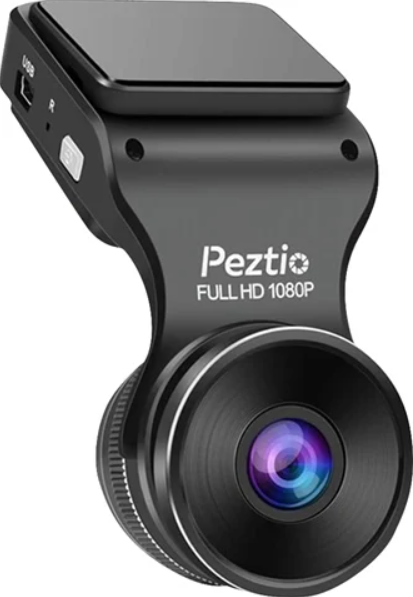
Introduction
The peztio Dashboard Camera is designed to deliver crystal-clear, high-resolution video recording tailored for drivers seeking reliable and advanced car surveillance. Featuring 4K Ultra HD resolution and a wide-angle lens, this dashcam captures every detail on the road with exceptional clarity both day and night. Its compact and sleek design ensures that it mounts unobtrusively behind the rearview mirror without obstructing your view, making it ideal for daily commuters, rideshare drivers, and vehicle enthusiasts.
Key benefits include enhanced safety through continuous loop recording, an efficient G-sensor that locks footage during sudden impacts, and seamless WiFi connectivity that allows quick video downloads and live-view via a dedicated app. Additionally, it supports 24-hour parking mode to monitor your vehicle when parked, giving you peace of mind against theft or hit-and-run incidents.
Priced competitively in the $100 to $150 range, the peztio Dashboard Camera offers features comparable to higher-end models but at an accessible price point. It is widely available online through official Peztio channels and major retailers, making it a practical choice for anyone wanting to upgrade their vehicle's safety and security system with professional-grade video quality.
Specifications and Features of the Peztio Dashboard Camera
- Video Resolution: 4K Ultra HD (3840 x 2160 pixels) at 30fps for sharp and detailed footage.
- Lens: 6G glass lens with 160-degree wide-angle coverage for a broader field of view.
- Sensor: Advanced GC CMOS sensor with WDR technology ensuring excellent color accuracy and night vision.
- Storage: Supports MicroSD cards up to 256GB (Class 10/UHS-3 recommended); 64GB card included.
- Connectivity: Built-in 5GHz WiFi enabling fast video transfer speeds up to 8MB/s with app control.
- Additional Features: Loop recording, G-sensor impact detection, 24-hour parking mode (requires optional Type-C hardwire kit), heat-resistant chipset for durability in extreme temperatures (-20°C to 75°C).
- Display: Compact design with a small integrated screen for easy setup and playback.
- Power: USB Type-C power input and built-in battery for emergency backup.
Compared to similar models like the ARIFAYZ Q4 or other 1080P dashcams, the Peztio Dashboard Camera stands out with its 4K resolution and superior WiFi speed, providing clearer videos and faster data management, making it highly competitive in its segment.
MAIN FUNCTION
- Build-in WIFI
Transfer your dash cam recordings to your smartphone or tablet over Wi-Fi using an app interface. This makes it easier than ever to share footage from your trips. - Loop Record
The Loop recording video can be set the timing 1 min, 3mins or 5 mins. It will save the vital videos in case losing or damaging the videos when an accident occurs, the TF card slipped out or the power connection is loosening. - Emergency Record
Parking Mode: When the Parking Mode is on, it will detect whether there is the moving object, and the recording will auto on for 10-20 seconds if it finds a moving object. - SOS mode
Press the SOS button to lock the video currently being recorded. (If you set the loop recording time to 3 mins, when you press the SOS button, the dash cam will lock the video currently being recorded. The length of this locked video file is 3 minutes. The next loop recording period begins, and the next video will not be locked).
PRODUCT STRUCTURE
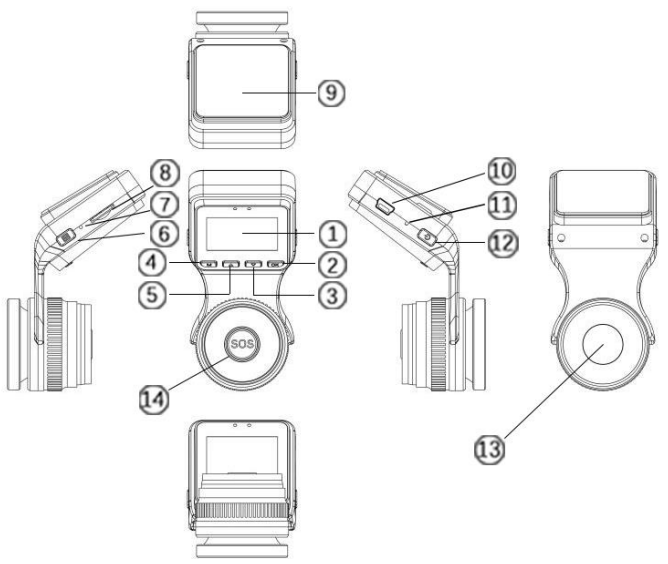
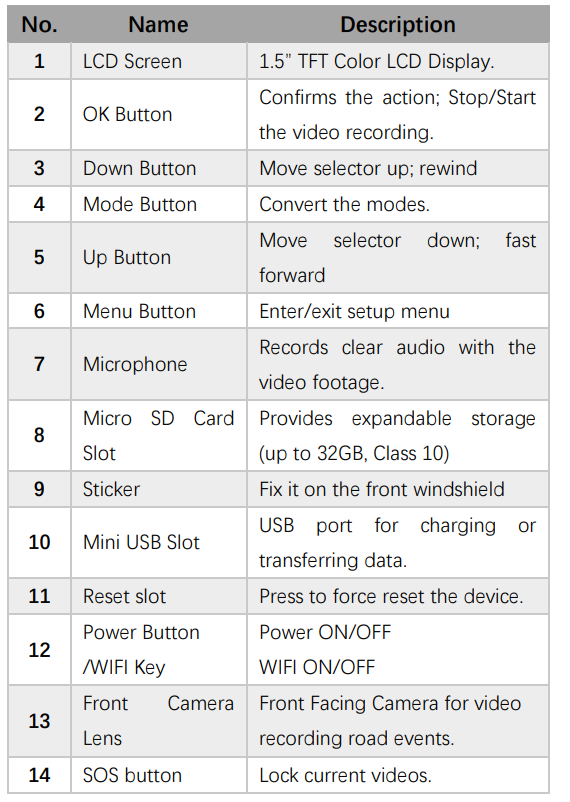
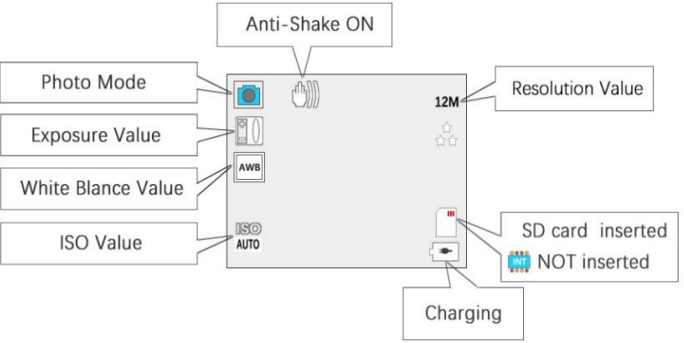
SCREEN OVERVIEW
Video Mode
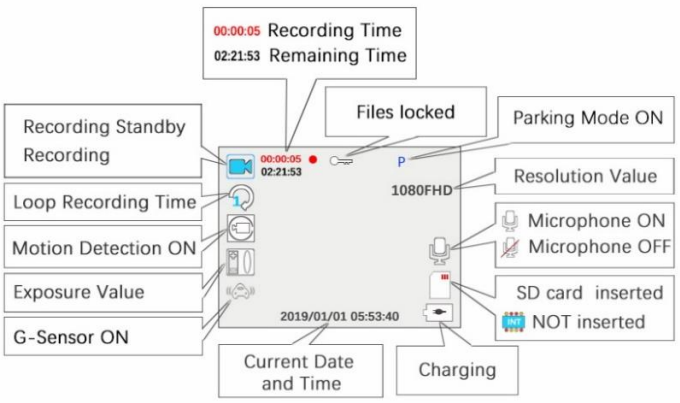
Photo Mode
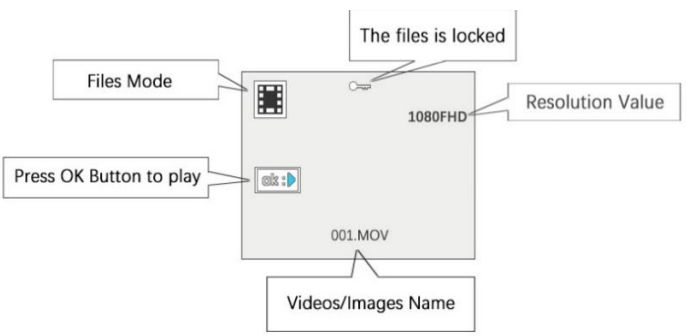
Playback Mode
START TO USE
Install the memory card.
Note: Please choose a good quality branded SD card between 8GB and 32GB (Class 10 or UHS type 1) and format the card within the setup menu before use. Please insert the card in the right direction.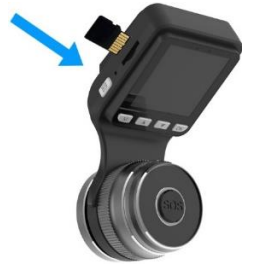
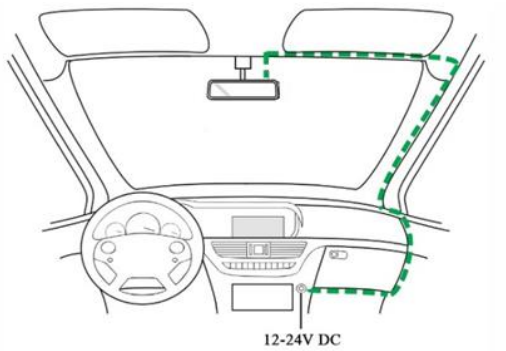
- Ensure the Mini USB Cable and Car Charger are well connected.
- Attach the dash cam to the front windshield
- Clean the front windscreen.
- Remove the protective sticker and attach it to the front windshield.
- Connect the charging cable to the cigarette lighter.
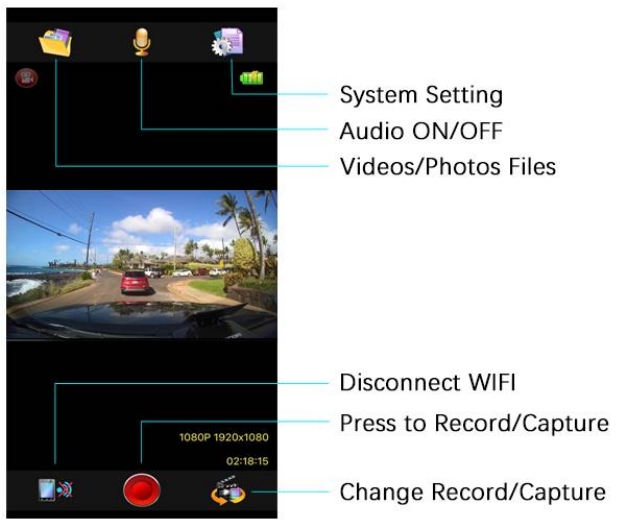
GoPlus Cam app usage
Connect to WIFI, enter the Goplus APP.
- Click to take photos/videos,
- Download photos and video files. You can check the photos/videos in your album.
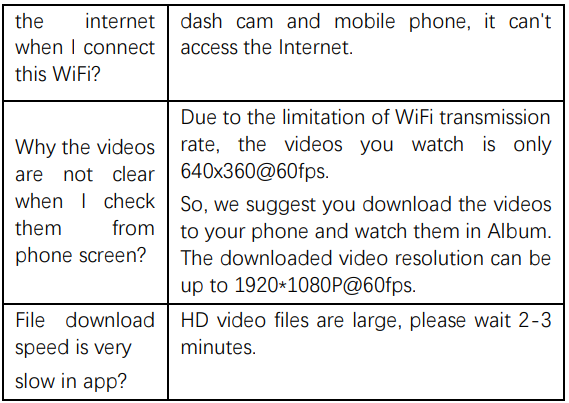
WIFI TROUBLE SHOOTING
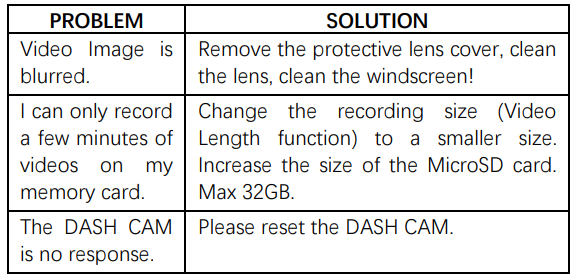
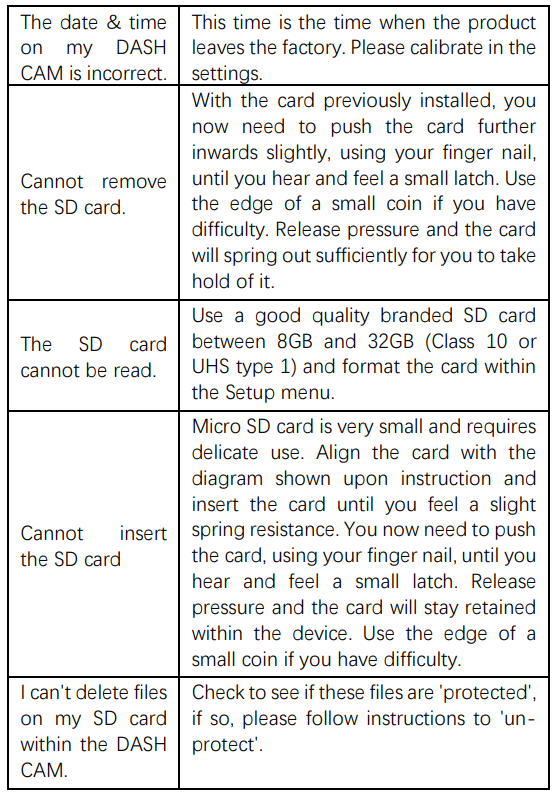
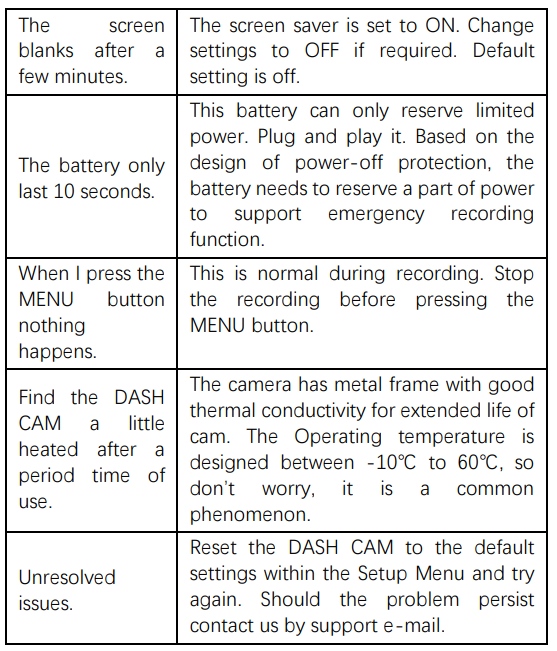
TROUBLE SHOOTING
Pros & Cons of the Peztio Dashboard Camera
- Pros:
- Stunning 4K video quality provides superior detail compared to standard 1080P dashcams.
- Fast 5GHz WiFi connectivity enables quick and seamless video downloads and live streaming.
- Robust loop recording and G-sensor features ensure accident footage is automatically saved and protected.
- 24-hour parking mode adds continuous surveillance when the vehicle is parked (with optional hardwire kit).
- Compact design does not obstruct driver visibility and is simple to install.
- Cons:
- Parking mode requires a separate purchase of a Type-C hardwire kit.
- Small built-in screen limits in-device video review; full playback is better on mobile or PC.
- Some users may find the app connectivity range limited to under 3 meters for smooth operation.
- Higher storage cards are needed for prolonged recording, which might increase the overall cost.
Overall, the Peztio Dashboard Camera offers excellent value for money, especially for those seeking 4K quality without premium pricing. When compared to alternatives like the BlackVue or Garmin models, it delivers similar core features at a fraction of the cost.
Customer Reviews and Feedback on the peztio Dashboard Camera
Users consistently praise the Peztio Dashboard Camera for its sharp 4K video clarity and ease of installation. Many highlight the fast WiFi transfer speeds and app functionality as major advantages that simplify managing footage. The loop recording and G-sensor reliability receive positive mentions for capturing critical events effectively.
Some common complaints include the limited range of the WiFi connection and the need to purchase the hardwire kit separately for full parking mode functionality. A few users note that the small screen size restricts direct video preview on the device itself.
Star ratings often range between 4 and 4.5 out of 5, reflecting solid customer satisfaction. Many reviewers recommend the Peztio Dashboard Camera as a cost-effective upgrade for drivers wanting high-quality video recording and dependable security features.
Faqs
How do I set up the peztio Dashboard Camera for the first time?
What should I do if the peztio Dashboard Camera WiFi connection is unstable or disconnects frequently?
Can the peztio Dashboard Camera record continuously in parking mode, and how do I enable this feature?
What are the key features of the peztio Dashboard Camera that enhance night driving safety?
Is the peztio Dashboard Camera compatible with memory cards larger than 64GB?
How does the G-sensor function work on the peztio Dashboard Camera and why is it important?
What maintenance is required to keep the peztio Dashboard Camera performing optimally?
Why might the peztio Dashboard Camera’s 4K video quality appear less sharp than expected?
More peztio manuals
- Setup & Pairing: Peztio Touch Screen Dash Cam User Manual
- How to Install: Peztio 1080P Dashcam M1 Setup Guide
- Setup & Pairing: Peztio Dash Cam 1080P High Definition Wide Angle Lens User Manual
- Setup Guide: Peztio 4K Dashcam A1 User Manual
- Setup & Pairing: Peztio Rearview Mirror Dash Camera User Manual
- How to install: Peztio Q1 Car Dash Cam 1080p HD User Manual
Leave a Comment