
Setup & Pairing: Peztio Touch Screen Dash Cam User Manual
Content
Peztio Touch Screen Dash Cam
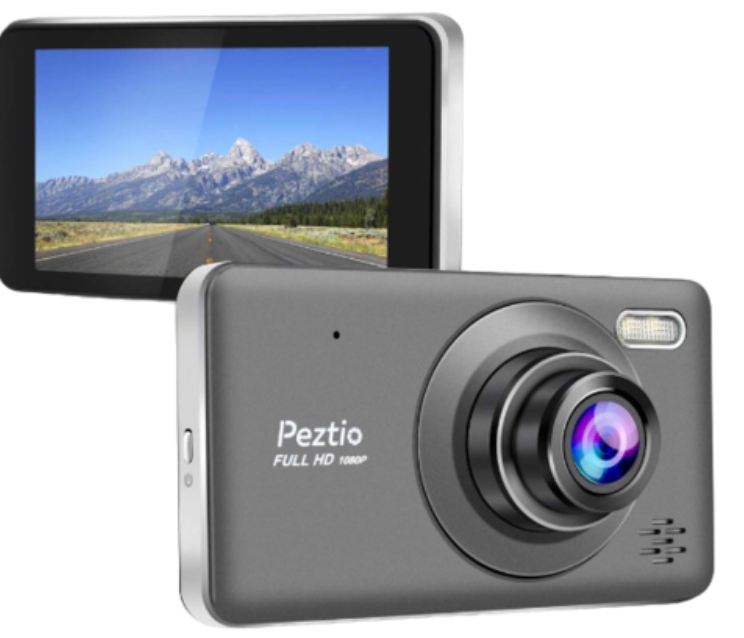
Introduction
The peztio Touch Screen Dash Cam is a versatile and user-friendly vehicle camera designed to enhance driver safety and security through clear, reliable video recording. Featuring a responsive touchscreen interface, this dash cam offers easy access to settings, playback, and video capture, making it ideal for daily commuters, rideshare drivers, and vehicle enthusiasts seeking to document their journeys or protect against road incidents. Its compact design fits discreetly behind the windshield, ensuring unobtrusive operation while delivering high-quality footage.
Key benefits of this dash cam include seamless loop recording, a built-in G-sensor for automatic incident detection, and advanced night vision capabilities that maintain clarity in low-light conditions. The device also supports Wi-Fi connectivity for convenient video transfer to smartphones, although it does not rely on GPS, focusing instead on straightforward performance and ease of use.
The peztio Touch Screen Dash Cam is especially suited for drivers looking for an affordable yet feature-rich dash camera solution. It typically ranges in price from approximately $70 to $100, making it competitive among mid-range dash cams. The product is widely available through online retailers like Amazon and eBay, as well as direct from the manufacturer’s website, providing easy accessibility for customers worldwide.
Specifications and Features of the Peztio Touch Screen Dash Cam
- Display: 3.16-inch or 4-inch touchscreen LCD providing intuitive menu navigation and video preview
- Video Resolution: Full HD 1080p recording, with some models offering up to 4K recording through interpolation
- Sensor: Galaxycore CMOS sensor (model unspecified), combined with a Novatek processor for efficient video processing
- Field of View: Wide-angle lens up to 170 degrees, capturing broad road coverage
- Recording Modes: Loop recording with automatic overwriting of the oldest footage, triggered by the G-sensor for collision detection
- Storage: Supports microSD cards from 32GB up to 256GB (Class 10 or UHS type 3 recommended), typically includes a 64GB card
- Connectivity: Built-in Wi-Fi for real-time video streaming and file transfer to Android/iOS devices via the Peztio app
- Power: Auto on/off via vehicle ignition, with built-in battery for short-term parking mode
- Night Vision: Enhanced low-light performance using WDR technology and a wide aperture lens (f/1.5)
- Materials & Durability: Constructed from heat-resistant PC and ABS plastic, rated to operate from -20°C to 75°C (-4°F to 167°F)
Compared to similar dash cams in the $70-$100 price range, the peztio Touch Screen Dash Cam stands out by combining touchscreen ease of use and Wi-Fi connectivity, though it lacks GPS functionality found in some competitors. Its video quality is strong for the category, though the "4K" label on some models is interpolated rather than native resolution, and frame rates at 4K are limited to 25fps.
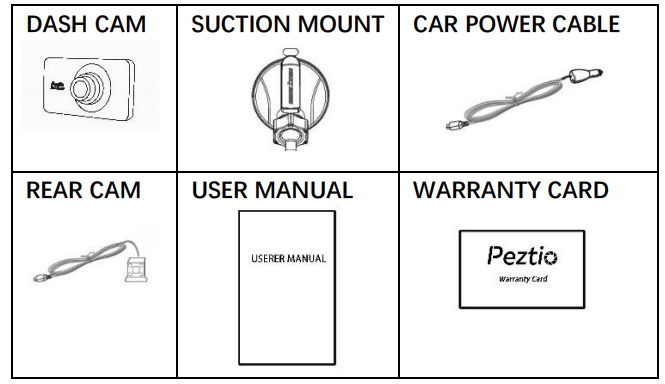
PACKAGE CONTENT
PRODUCT STRUCTURE
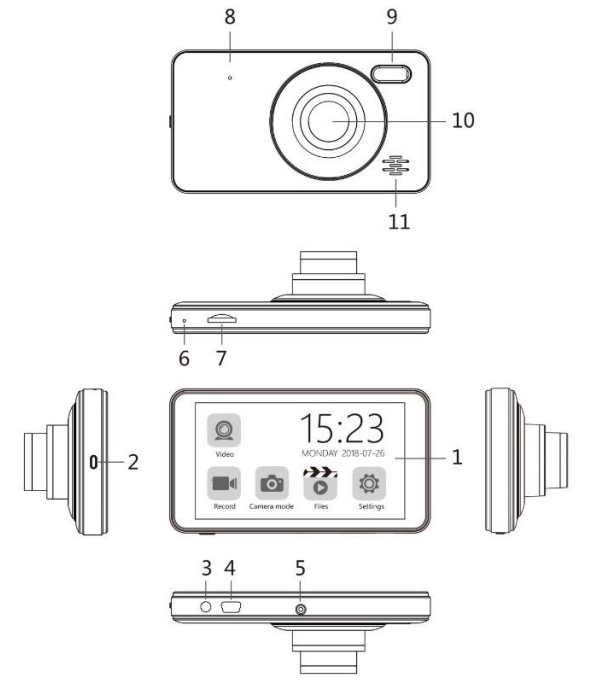
- IPS Touch screen
- Power button/ Shot change button/ Screen save button
- Rear camera interface
- Rear camera interface
- USB data interface
- Mount connection
- MIC
- TF card slot
- Reset
- Fill light
- Lens
- Speaker
INSTALLATION GUIDANCE
INSTALL THE FRONT CAMERA
Insert the TF card as shown above. Please gently insert the TF card into the slot.
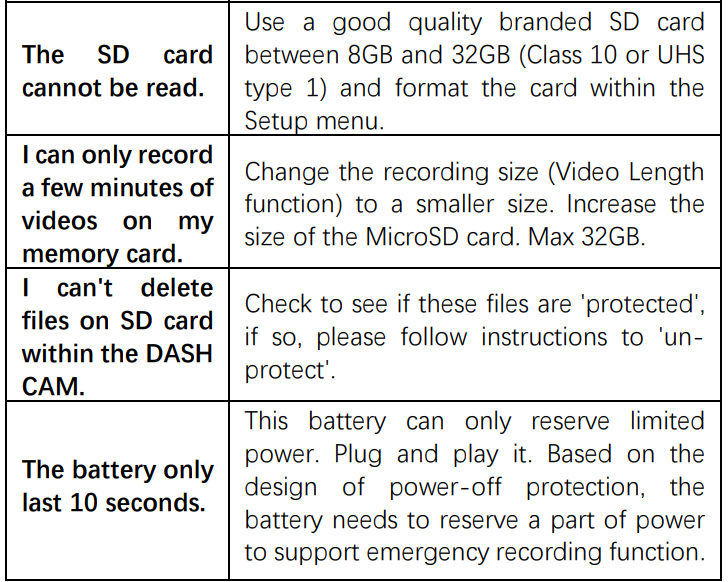
WARNING : Please choose a good quality branded SD card between 8GB and 32GB (Class 10 or UHS type 1) and format the card within the setup menu before use. Please insert the card in the right direction.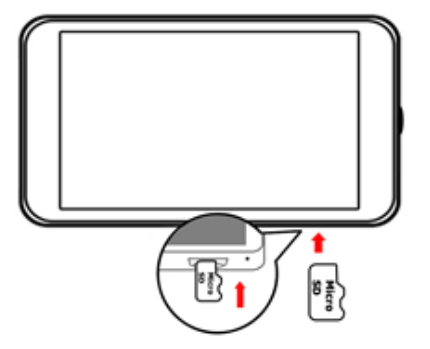
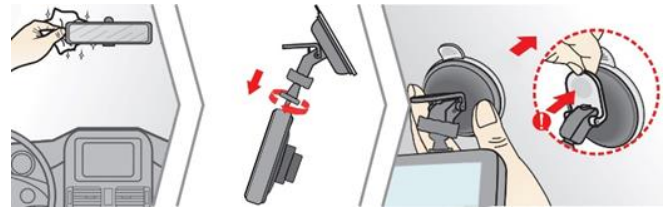
- Mount the front camera
- Clean the front windscreen.
- Assemble the suction mount and front camera together.
Remove the e protective plastic film from the suction pad, push the suction cup onto the inner windshield in a suitable position (Won't shade your vision while driving), and press the suction bracket handle to ensure that it is well fixed.
Connect the car's original charger to the cigarette lighter.
Route the cables through the top ceiling and the A-pillar so that it does not interfere with driving.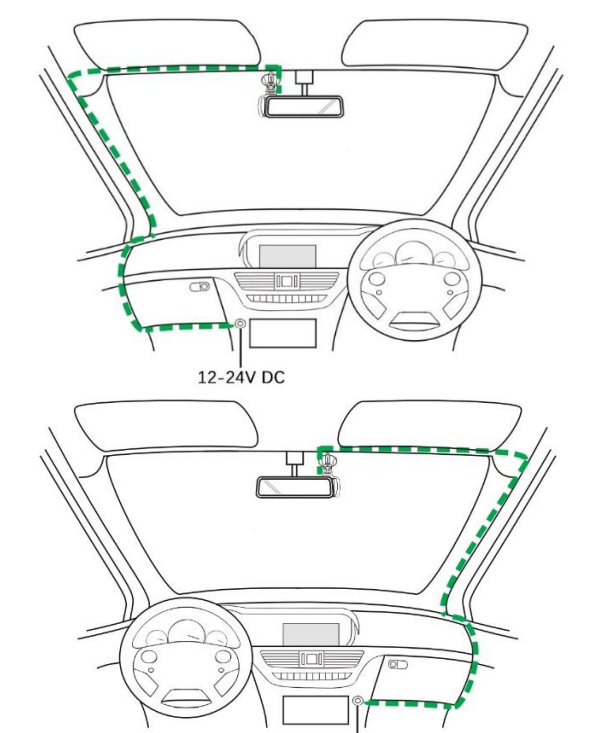
INSTALL THE REAR CAMERA
- Please connect the cables as shown above:
- Connect the socket to the dash camera’s rear camera interface.
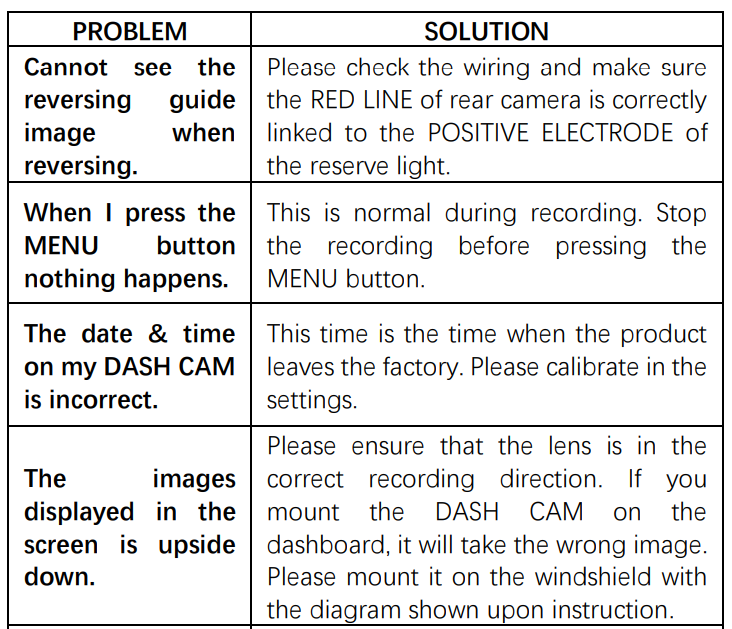
- Connect the red cable to the positive lead of the reversing lamp.
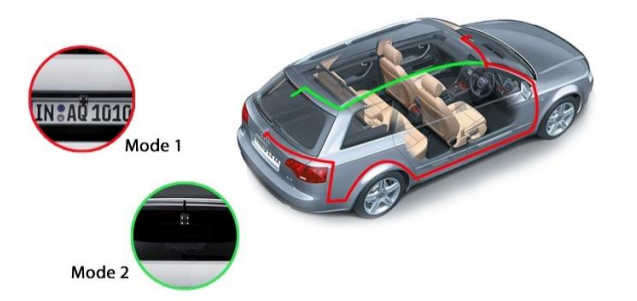
- There are two methods to place the camera:
- Mode 1: Mount on the rear windscreen. The package includes a 3M glue for the rear camera. Please clean the rear windscreen and find an appropriate position before you stick the rear camera onto the windscreen.
- Mode 2: Mount near the license plate. The package includes fixing screws to help you fix it.
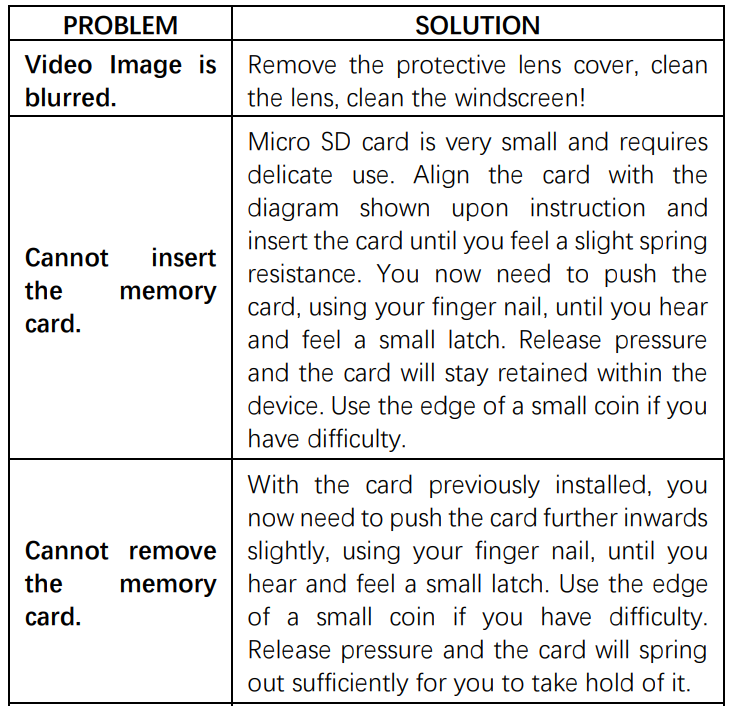
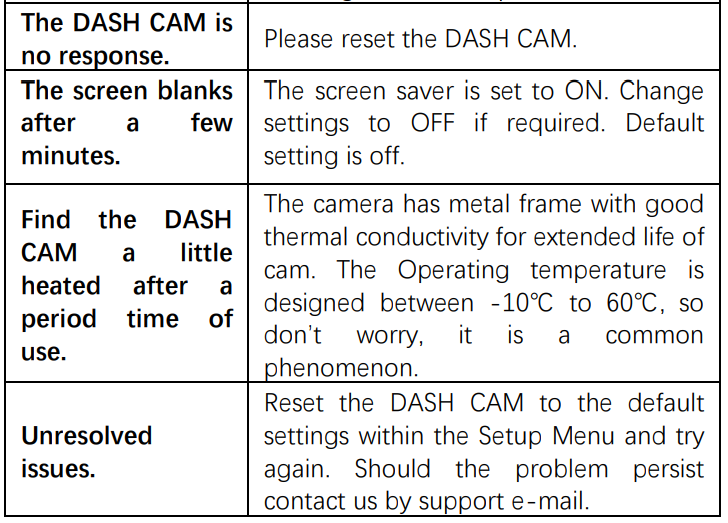
TROUBLE SHOOTING
Pros & Cons of the peztio Touch Screen Dash Cam
- Pros:
- Clear and easy-to-use touchscreen interface simplifies operation and settings adjustment
- Built-in Wi-Fi enables convenient video transfer and remote viewing on smartphones
- Strong night vision with WDR and a wide aperture lens enhances safety during low-light driving
- Loop recording and G-sensor protect key incident footage automatically
- Affordable price point with an included 64GB memory card offers good value
- Cons:
- No GPS functionality, limiting location/time data embedding
- Build quality uses plastic that may not withstand extreme heat over time
- “4K” video is interpolated with 25fps, less smooth than true 4K dash cams
- Camera angle fixed; no swivel option to record sides or inside the vehicle
- App lacks some advanced features found in competitors’ software
Overall, the peztio Touch Screen Dash Cam offers solid performance for budget-conscious drivers who value usability and basic advanced features, but may fall short for those needing GPS tracking or premium video quality.
Customer Reviews and Feedback on the peztio Touch Screen Dash Cam
Users generally praise the Peztoooo Touch Screen Dash Cam for its intuitive touchscreen interface, reliable Full HD recording, and excellent night vision capabilities. Many highlight the convenience of Wi-Fi connectivity for easy video access on smartphones. The 64GB memory card included is often noted as a positive value addition.
Common complaints include occasional video quality inconsistencies at the highest resolution, concerns about the plastic body’s heat resistance, and the absence of GPS tracking. Several users mention that real-time phone streaming can lag if the device and phone are not in close proximity.
Typical star ratings average around 4 out of 5, with frequent recommendations for commuters and rideshare drivers seeking an affordable dash cam with touchscreen ease. Users advise formatting SD cards through the device and resetting if errors arise, reinforcing the importance of using quality storage media.
Faqs
How do I set up the peztio Touch Screen Dash Cam for first-time use?
What should I do if my peztio Touch Screen Dash Cam's SD card is not being recognized?
Can I connect the peztio Touch Screen Dash Cam to my smartphone via Wi-Fi?
How does the G-sensor feature work on the peztio Touch Screen Dash Cam?
What video recording resolutions and frame rates does the peztio Touch Screen Dash Cam support?
How can I optimize night vision with the peztio Touch Screen Dash Cam?
What maintenance is recommended to keep the peztio Touch Screen Dash Cam functioning properly?
Why does the peztio Touch Screen Dash Cam screen not display full-size videos?
More peztio manuals
- Setup & Pairing: Peztio Dash Cam 1080P High Definition Wide Angle Lens User Manual
- Setup: Peztio Dashboard Camera User Manual
- Setup & Pairing: Peztio Rearview Mirror Dash Camera User Manual
- How to Install: Peztio 1080P Dashcam M1 Setup Guide
- Setup Guide: Peztio 4K Dashcam A1 User Manual
- How to install: Peztio Q1 Car Dash Cam 1080p HD User Manual
Leave a Comment