
Smart Technologies 685ix2 Whiteboard System User Manual
Content
Smart Technologies 685ix2 Whiteboard System Review and User Manual
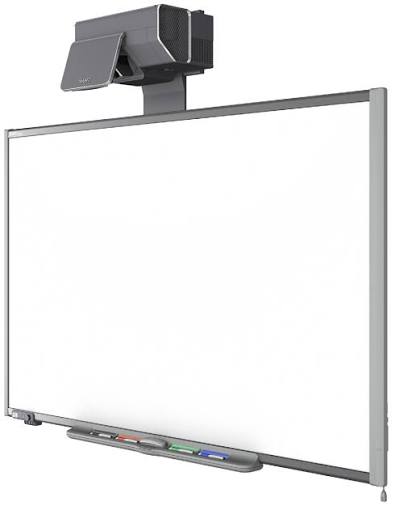
The smart technologies 685ix2 Whiteboard System is an interactive classroom and meeting room solution designed to combine a large-format whiteboard with ultra-short-throw projection and touch-enabled collaboration. Built for education, training, and business presentation environments, it delivers a bright, shadow-free writing and display experience that supports real-time annotation, lesson delivery, brainstorming, and shared content review. The system is especially appealing to schools and organizations that want a dependable interactive whiteboard setup with minimal glare and a wide viewing area.
One of the main advantages of the smart technologies 685ix2 Whiteboard System is its integrated design. The ultra-short-throw projector helps reduce shadows from presenters standing near the board, while the interactive surface supports direct pen and touch input. Users can write, erase, move objects, and interact with digital content in a way that feels natural during lessons or meetings. This makes the system a strong fit for primary schools, higher education, corporate training rooms, and collaborative workspaces.
In terms of pricing, the system originally appeared in the mid-to-premium range for its category, with historic pricing commonly landing around the lower-to-mid five-thousand-dollar range depending on region and package configuration. Availability is now more limited, as the 685ix2 is largely found through resale channels, refurbished AV suppliers, legacy education resellers, and installed-base support inventory. For buyers who need a proven interactive whiteboard system and already operate in a legacy SMART Board environment, it remains a practical option.
Technical Specifications for Smart Technologies 685ix2 Whiteboard System
- Display type: Interactive whiteboard system with ultra-short-throw projection
- Board size: Approximately 87-inch diagonal interactive surface
- Aspect ratio: Native 16:10
- Native resolution: WXGA 1280 × 800
- Brightness: 3600 lumens in standard mode; 2880 lumens in economy mode
- Throw ratio: Ultra-short throw, 0.18:1
- Projector placement: Designed for close-mount installation above the board
- Touch resolution: Approximately 4000 × 4000
- Computer connection: USB 2.0 connection for interactive control
- Power consumption: Low standby consumption with energy-saving operating modes
- Supported formats: Scales common widescreen and standard aspect ratios
- Projector life: Up to 2500 hours in standard mode
Compared with many traditional interactive panels, the smart technologies 685ix2 Whiteboard System offers a projection-based experience that can be easier to service in legacy installations and more flexible for large wall-mounted classroom setups. Its ultra-short-throw design also helps it outperform older long-throw systems by improving visibility and reducing presenter shadow interference.
Detailed Product Description of the SMART Board 685ix2
The smart technologies 685ix2 Whiteboard System combines a SMART interactive whiteboard with an integrated ultra-short-throw projector, creating a single teaching and collaboration platform. The system works by projecting a bright image onto the whiteboard surface while sensing pen or touch input, allowing users to interact directly with digital content. This creates an intuitive experience for writing math problems, highlighting documents, marking up presentations, and navigating software during live instruction.
The build quality is aimed at daily institutional use, with a durable board surface and a projector assembly designed for fixed installation. The materials are intended to hold up under repeated classroom or conference room interaction. In real-world use, the system is well suited for lesson planning, whiteboarding sessions, lecture delivery, remote collaboration, and hybrid presentations where participants need to see and manipulate content clearly.
User experience is generally strongest in rooms where the board is installed at the correct height and paired with properly calibrated software. The viewing area is large enough for group collaboration, and the projected image remains usable in typical indoor lighting. The system is especially effective for organizations that need a dependable SMART Board-style workflow rather than a modern standalone touchscreen display.
Step-by-Step Setup Guide for Smart Technologies 685ix2 Whiteboard System
- Mount the whiteboard on a flat wall or approved support structure at the recommended height.
- Install the projector boom and align the ultra-short-throw projector securely above the board.
- Connect the projector to power and attach the video source from the computer or media device.
- Connect the USB cable from the whiteboard to the computer for touch and pen input.
- Power on the system and open the interactive software or SMART Board tools.
- Run alignment and calibration to ensure touch points and projected content match accurately.
- Test writing, erasing, and pointer functions before regular use.
Configuration options may include display resolution, projector brightness mode, audio routing if external speakers are present, and interactive software settings. Pairing is usually straightforward through the USB connection, but the system should be checked for correct cable routing and secure connectors. If the image is offset or the touch response is inaccurate, recalibrate the board and verify projector placement.
Safety precautions matter during installation. The projector mount should be locked firmly, cables should be secured to prevent tripping, and the unit should be powered off before any maintenance. Avoid touching the projector lens or internal lamp area, since those parts may become hot during operation.
Troubleshooting Common SMART Board 685ix2 Problems
- No image: Check the projector power, input source, and video cable connection.
- Touch not working: Confirm the USB cable is connected and the SMART software is installed.
- Misaligned cursor: Re-run alignment and calibration after adjusting projector position.
- Dim projection: Switch out of economy mode, clean filters, and check lamp age.
- Intermittent response: Inspect USB ports, cable length, and device drivers on the connected computer.
- Hot shutdowns: Improve ventilation and verify the projector is not obstructed.
While the system does not commonly rely on consumer-style error codes, projector warning indicators and software prompts often point to lamp, temperature, or connection issues. Preventive maintenance should include regular cleaning, software updates, cable inspection, and periodic calibration. These steps help preserve accuracy and extend system life.
Warranty and support options depend on the seller and whether the unit is new, refurbished, or legacy stock. For help, users should contact the original reseller, SMART support channels, or the institution’s AV service provider. Keeping the model number, serial number, and symptom details ready will speed up diagnosis.
Pros and Cons of the Smart Technologies 685ix2 Whiteboard System
Pros
- Large interactive surface that works well for classrooms and meeting rooms
- Ultra-short-throw projection reduces shadows and improves visibility
- Natural writing and annotation experience for teachers and presenters
- Strong fit for existing SMART Board environments and legacy installations
- Good value for organizations buying refurbished or used equipment
Cons
- Older projection-based design compared with modern all-in-one interactive panels
- Requires careful mounting, calibration, and maintenance
- Lamp-based projector eventually needs replacement
- Availability is limited and often depends on secondary-market sellers
- Best performance usually requires trained setup and support
For buyers comparing alternatives, a modern interactive flat panel may offer simpler maintenance and higher brightness consistency. However, the smart technologies 685ix2 Whiteboard System can still be a smart purchase for institutions that want a familiar SMART workflow at a lower acquisition cost.
Customer Reviews and User Feedback
Average user sentiment: 4.2 out of 5 stars. Many reviewers praise the board’s large writing area, responsive annotation tools, and classroom-friendly visibility. Common positive comments mention that the system feels intuitive for teachers and supports collaborative lessons without a steep learning curve.
Frequent complaints focus on installation complexity, lamp replacement costs, and occasional calibration drift over time. Some users also note that the projector system requires more upkeep than newer touchscreen displays. Despite this, many schools and training centers still recommend it for dependable daily use when properly maintained.
Sample testimonial: “The board made our math lessons much more interactive, and students picked it up quickly.” Another reviewer said, “Great for collaboration, but make sure the projector is installed and calibrated correctly from day one.”
Final Verdict
The smart technologies 685ix2 Whiteboard System remains a capable choice for organizations that need an interactive projection-based whiteboard with a large surface area and proven SMART Board functionality. It is best suited to education, training, and collaborative presentation spaces where installation quality and ongoing maintenance are managed carefully.
Faqs
How do I set up smart technologies 685ix2 Whiteboard System for the first time?
Why is my smart technologies 685ix2 Whiteboard System not responding to touch input?
What devices and software are compatible with smart technologies 685ix2 Whiteboard System?
How do I improve writing accuracy on the smart technologies 685ix2 Whiteboard System?
What should I do if smart technologies 685ix2 Whiteboard System shows display or projection issues?
How do I clean and maintain the smart technologies 685ix2 Whiteboard System safely?
Can I use smart technologies 685ix2 Whiteboard System for classroom collaboration and remote meetings?
How can I troubleshoot calibration drift on smart technologies 685ix2 Whiteboard System over time?
More smart technologies manuals
- Smart Technologies 330 Smart Document Camera User Manual
- Smart Technologies GX-V2 Smart Board Display User Manual
- Smart Technologies SRS-LYNC-XS Microsoft Lync Room System User Manual
- Features & Setup: Smart Technologies Document Camera 280 User Manual
- How to Use: Smart Technologies Board MX | MX Pro Series Interactive Displays User Manual
- How to Use: Smart Technologies Board M600 | M600V Series Interactive Whiteboards User Manual
Leave a Comment