
Setup: Xgimi Aura 4K Ultra Short Throw Laser Projector User Manual
Content
XGIMI Aura 4K Ultra Short Throw Laser Projector

Introduction to the XGIMI Aura 4K Ultra Short Throw Laser Projector
The XGIMI Aura 4K Ultra Short Throw Laser Projector represents a revolutionary advancement in home entertainment technology, combining cutting-edge laser projection with ultra-short throw capability to transform any room into a premium cinema experience. This innovative 4K laser projector delivers True 4K UHD resolution with 8.3 million individual pixels, allowing you to project a stunning 150-inch display from just 17.3 inches away from your wall.
Designed for modern homeowners seeking a space-efficient alternative to traditional televisions, the XGIMI Aura 4K projector features an advanced ALPD laser technology and HDR10 support, ensuring vivid, lifelike colors that match the content creator's original vision. With 1800 ISO Lumens of brightness, this ultra-short-throw laser projector performs exceptionally well even in daylit rooms or spaces with ambient lighting, making it ideal for living rooms, bedrooms, and media spaces where traditional projectors would struggle.
The XGIMI Aura 4K Ultra Short Throw Laser Projector is priced at approximately $2,449, positioning it as a premium option for serious home theater enthusiasts and professionals seeking superior image quality and innovative space-saving design. This laser projector is particularly suited for movie enthusiasts, gamers, sports fans, and anyone looking to upgrade their entertainment setup without sacrificing valuable floor space. The projector's 20,000-hour laser lifespan ensures reliable performance for over a decade of daily use, making it an excellent long-term investment in home entertainment technology.
Technical Specifications of the XGIMI Aura 4K Ultra Short Throw Laser Projector
Display Technology and Resolution:
- Display Type: 0.47-inch DLP (Digital Light Processing) with Texas Instruments DMD chipset
- Native Resolution: 3840 x 2160 pixels (True 4K UHD)
- Individual Pixels: 8.3 million pixels on-screen
- Aspect Ratio: 16:9
- 3D Capability: Yes (Frame Packing & Side by Side)
- Supported Video Formats: 480p, 720p, 1080i, 1080p, 2160p
Brightness and Color Performance:
- Brightness: 1800 ISO Lumens (manufacturer specification)
- Light Source: Advanced ALPD laser technology
- Color Gamut: 90% Rec.. Rec 709 and 80% DCI-P3
- Color Processing: 10-bit
- HDR Support: HDR10 and HLG formats
- Color Depth: Over 1 billion colors
Projection Specifications:
- Throw Ratio: 0.233:1 (Ultra Short Throw)
- Minimum Projection Distance: 11.7 inches for 80-inch display
- Maximum Projection Distance: 17.3 inches for a 150-inch display
- Image Size Range: 80 inches to 150 inches
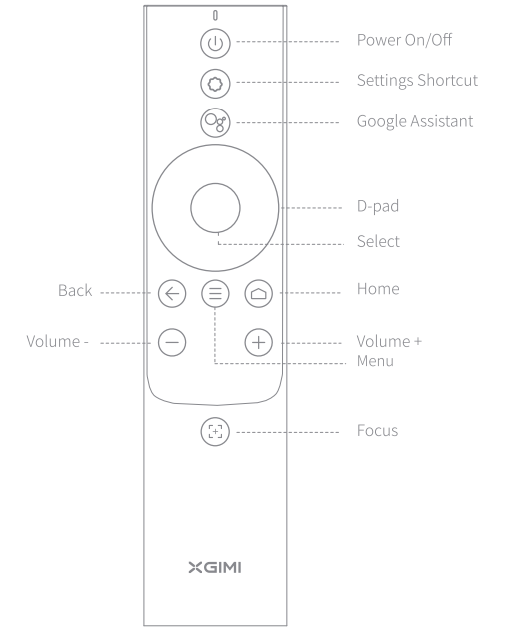
- Focus: Manual focus via remote control
- Keystone Correction: 8-point and 4-point keystone correction
Processing and Performance:
- Processor: MediaTek MT9629 platform
- RAM: 2GB
- Storage: 32GB internal storage
- MEMC Technology: Motion Estimation, Motion Compensation with 60Hz frame interpolation
- Image Engine: X-VUE 2.0 for enhanced clarity and fidelity
- Startup Time: 12 seconds
Audio System:
- Speaker Configuration: 60-watt Harman/Kardon stereo audio system
- Speaker Drivers: 2 tweeters and 2 woofers (15 watts each)
- Sound Output: 60 watts total
- Noise Level: Less than 32 dB (30 dB operating)
Connectivity Options:
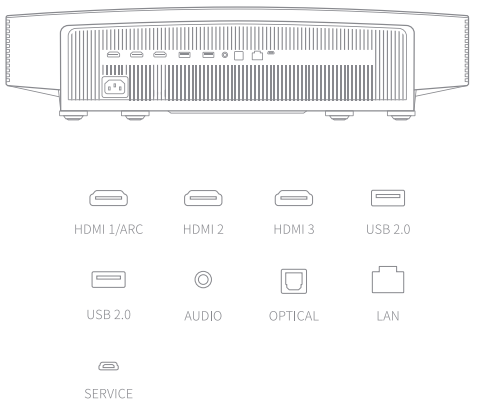
- HDMI Ports: 3 (2 standard HDMI 2.0 + 1 with eARC support)
- USB Ports: 3 USB 2.0 ports (one located on the side)
- Ethernet: Gigabit RJ45 LAN port
- Audio Output: Optical and 3.5mm headphone jack
- WiFi: Dual-band 2.4/5GHz (802.11a/b/g/n/ac)
- Bluetooth: Bluetooth 5.0/BLE
Operating System and Smart Features:
- Platform: Google Android TV with Google Assistant
- Streaming: Chromecast built-in
- Smart Integration: Compatible with major streaming services
Physical Specifications and Power:
- Dimensions: 23.9" W × 15.8" D × 5.5" H
- Weight: 24.3 pounds
- Power Input: 100V-240V (universal voltage)
- Laser Lifespan: 20,000 hours (approximately 10+ years of daily use)
What's Included
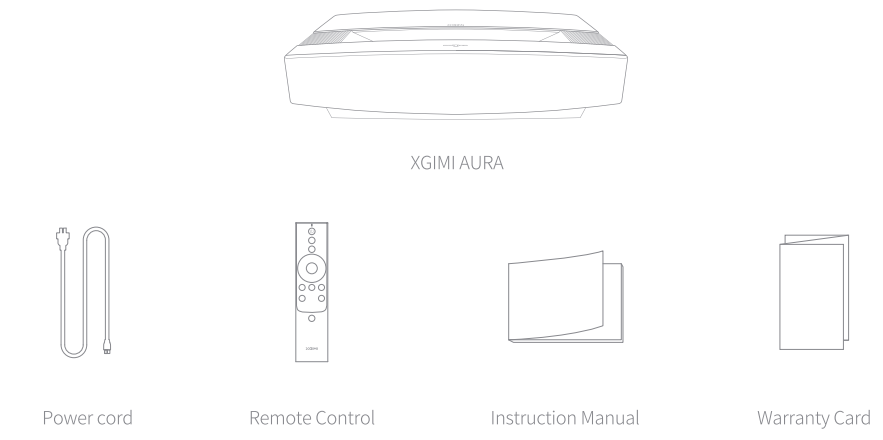
Overview
Front & Top View

Side View (right)
.png)
Rear View
Remote Control
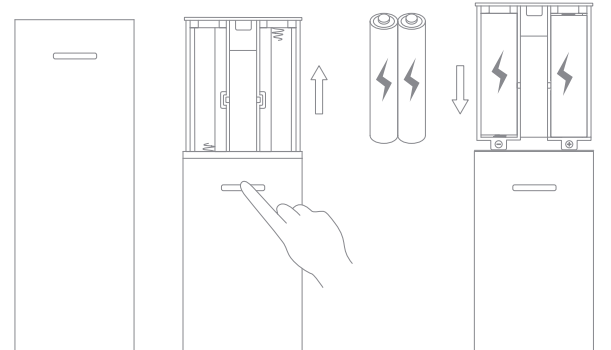
Using the Remote Control
- Upon the first use, press the battery compartment release button on the back of the remote control to remove the battery compartment. Then, insert two AAA batteries.
- When you insert the batteries, make sure that the and - symbols on the batteries match the and - symbols inside the battery compartment, and then press the battery compartment back onto the remote control.
If you need to replace the batteries later, repeat the directions above.
Powering on the Device
- Connect the power cord to the XGI MI AU RA.
- Connect the power cord to the power socket.
- Press the power button to turn on the device.

Important Precautions
Correct use of the device:
- Do not face the lens into the eyes because the strong projector light may cause injury to the eyes.
- Do not block the air inlet/outlet of the device in order to avoid damage to internal electronic devices arising from normal heat dissipation failure of the device.
- Do not wipe the lens directly with cleaning tools, including paper and cloth, in order to avoid damage to the lens. Please clean up the dust on the lens surface by blowing clean air.
- Do not wash the device with chemicals, detergents, or any liquid to prevent the circuit board from being corroded by rainwater, moisture, and mineral-containing liquids.
- Keep the device and its components and accessories out of reach of children.
- Make sure that the device is used in a dry and ventilated environment.
- Do not store the device in overheated or overcooled places, because extreme temperatures will shorten the life of electronic devices. Place and use the device in an environment of 0°C-40°C.
- Do not put the device into any heating equipment (such as a dryer or microwave oven) for drying.
- Do not firmly extrude the device or place barriers on it or its back to avoid damage to the device.
- Do not throw, strike, or sharply vibrate the device to avoid damage to the internal circuit board.
- Do not try to disassemble and assemble the device yourself. If any issue occurs, please contact the after-sales service of XGIMI.
- Do not repair any product on your own. If the device or any component cannot work properly, consult the after-sales service of XGlMI in a timely manner or return it to the factory for repair.
Troubleshooting Guide for XGIMI Aura 4K Ultra Short Throw Laser Projector
Common Issues and Solutions:
- Image Not Displaying or Projector Won't Turn On: First, verify that the power cable is securely connected to both the projector and the electrical outlet. Check that the outlet is functioning by plugging in another device. If the projector still won't power on, wait 30 seconds and try again, as the startup sequence may require additional time. Ensure the laser light source hasn't reached its end-of-life by checking the maintenance menu for laser hours. If the projector powers on but no image appears, verify your HDMI or wireless connection is properly configured and that your source device is outputting video.
- Blurry or Out-of-Focus Image: Use the remote control to access manual focus adjustment and carefully fine-tune the focus until the image becomes sharp. If the image remains blurry after focus adjustment, check that the lens is clean and free from dust or debris. Clean the lens gently with a soft, lint-free cloth. Ensure the projector is positioned on a level surface, as tilting can affect focus quality. If you're projecting from an extreme angle, use the 8-point keystone correction feature to properly align the image geometry.
- Dim or Low Brightness Output: Access the brightness settings menu and select the "Bright" or "Performance" mode rather than "Eye Protection" mode. Check that no dust has accumulated on the lens or internal vents, as this restricts light output. Ensure your projection surface is a light-colored, matte white screen for optimal brightness. If brightness remains low, the laser light source may be degrading—check the laser hours in the maintenance menu. A laser approaching 20,000 hours will produce noticeably reduced brightness and should be serviced.
- Color Issues or Inaccurate Color Reproduction: Navigate to the picture settings menu and select "Movie" mode for the best color accuracy. If colors appear oversaturated or washed out, adjust the color balance slider in the custom settings. Verify that your source content is encoded in HDR10 format for optimal color performance. Check that you're using a high-quality HDMI 2.0 cable, as inferior cables can cause color degradation. If color problems persist, perform a factory reset by accessing the system settings menu.
- WiFi or Bluetooth Connectivity Issues: Restart the projector completely by powering it off for 30 seconds, then powering it back on. Go to WiFi settings and forget the network, then reconnect using the correct password. If the projector still won't connect, move it closer to your WiFi router to improve signal strength. For Bluetooth issues, unpair the device from the projector settings, then re-pair it by holding the pairing button for 3 seconds. Ensure your WiFi router supports 2.4GHz or 5GHz bands, as the projector requires one of these frequencies.
- HDMI or Connection Not Recognized: Power off both the projector and your source device completely. Wait 30 seconds, then power on the projector first, followed by your source device. Try a different HDMI port on the projector, as one port may be defective. Test with a different high-quality HDMI 2.0 cable to rule out cable issues. If using the eARC port, ensure your source device supports eARC functionality. For USB connections, use the USB 2.0 ports on the back of the projector rather than the side port for more stable connections.
- Remote Control Not Responding: Replace the batteries in the remote control with fresh alkaline batteries. Ensure there are no obstructions between the remote and the projector's infrared sensor. Point the remote directly at the projector from a distance of less than 23 feet. If the remote still doesn't respond, perform a factory reset on the projector using the physical reset button located on the back panel (hold for 10 seconds). Consider using the mobile app alternative—download the XGIMI app on your smartphone to control the projector via WiFi.
- Warranty and Support: The XGIMI Aura 4K Ultra Short Throw Laser Projector typically includes a 2-year manufacturer's warranty covering defects in materials and workmanship. Extended warranty options are available at purchase. For technical support, contact XGIMI's customer service team through their official website or authorized retailers. Keep your purchase receipt and serial number readily available when seeking warranty service. Most hardware issues can be resolved remotely through XGIMI's technical support team before requiring physical service or replacement.
Advantages and Disadvantages of the XGIMI Aura 4K Ultra Short Throw Laser Projector
Key Advantages:
- Revolutionary Ultra-Short Throw Technology: The XGIMI Aura's 0.233:1 throw ratio is genuinely impressive, allowing you to place the projector just 11.7 inches from a wall to achieve an 80-inch display or 17.3 inches for a massive 150-inch screen. This space-saving capability makes it perfect for apartments, smaller living rooms, and modern home designs where traditional projectors with longer throw ratios simply won't fit. You can literally replace your television without needing to mount the projector on the ceiling or position it across the room.
- Exceptional 4K Picture Quality: With True 4K UHD resolution and 8.3 million individual pixels, the XGIMI Aura 4K Ultra Short Throw Laser Projector delivers stunning visual clarity and detail. The advanced ALPD laser technology combined with HDR10 support ensures colors are vibrant, accurate, and lifelike. Whether you're watching movies, streaming TV shows, or playing video games, the image quality rivals premium cinema experiences.
- Outstanding Brightness for Daytime Viewing: At 1800 ISO Lumens, this laser projector maintains excellent brightness even in daylit rooms or spaces with ambient lighting, making it one of the few projectors that truly performs in non-dark environments.[3][5] This versatility means you're not restricted to using it only in blackout rooms or at night.
- Premium Audio System: The integrated 60-watt Harman/Kardon audio system with dual tweeters and woofers delivers impressive sound quality, reducing the need for external speakers. This all-in-one audio-visual solution creates a truly immersive entertainment experience.
- Extended Laser Lifespan: With a 20,000-hour laser lifespan, this projector will reliably serve you for over a decade of regular use, offering excellent long-term value compared to lamp-based projectors requiring frequent replacements.
- Smart Features and Connectivity: Running on Google Android TV with built-in Google Assistant and Chromecast, the XGIMI Aura 4K Ultra Short Throw Laser Projector integrates seamlessly with modern smart home ecosystems and streaming services.
Key Disadvantages:
- Premium Pricing: At approximately $2,449, the XGIMI Aura 4K Ultra Short Throw Laser Projector represents a significant investment compared to traditional televisions or standard projectors. This high price point may be prohibitive for budget-conscious consumers, though the long-term value and innovative technology justify the cost for serious home theater enthusiasts.
- Limited Customization: While the projector offers multiple brightness and picture modes, it provides relatively limited customization options compared to professional-grade projectors. Advanced users seeking granular control over color grading, gamma curves, and other technical parameters may find the adjustment options somewhat restrictive.
- Requires Proper Screen Surface: To achieve optimal performance, the XGIMI Aura 4K Ultra Short Throw Laser Projector requires a dedicated projection screen or high-quality white wall surface. Projecting onto standard painted walls or colored surfaces will result in degraded image quality and inaccurate colors. This additional requirement adds to the overall installation cost.
- Learning Curve for Initial Setup: While the projector is user-friendly, initial setup involving keystone correction, focus adjustment, and network configuration may require patience and technical knowledge for first-time users unfamiliar with projector technology.
- Noise Level Consideration: At 30-32 dB operating noise, the projector produces audible fan noise during operation, which some users may find distracting during quiet scenes in movies or while using it for presentations.
Real Customer Reviews and Feedback on XGIMI Aura 4K Ultra Short Throw Laser Projector
- Overall Customer Satisfaction: Users consistently praise the XGIMI Aura 4K Ultra Short Throw Laser Projector for its innovative ultra-short throw capability and exceptional picture quality. Most customers report high satisfaction with the purchase decision, particularly those transitioning from traditional televisions to large-screen projection.
- Frequently Praised Features: Customers highlight the stunning 4K image quality, impressive brightness for daytime viewing, and innovative space-saving design as standout features. The integrated Harman/Kardon audio system receives particular praise for delivering room-filling sound without requiring separate speakers. Users appreciate the quick 12-second startup time and intuitive Google Android TV interface.
- Common Customer Concerns: Some users mention the premium pricing as a barrier to entry, though most feel the investment is justified by the technology and performance. A few customers note that proper keystone correction requires initial adjustment time. Some users report that the projector performs best with a dedicated projection screen rather than bare walls, which may necessitate additional investment.
- Recommended Use Cases: Customers report excellent results for movie nights, sports viewing, video gaming, and casual television streaming. Home theater enthusiasts consistently recommend this projector to others seeking a space-efficient alternative to large televisions. The projector is particularly recommended for living rooms, bedrooms, and media rooms where traditional projectors wouldn't fit due to space constraints.
Why Choose the XGIMI Aura 4K Ultra Short Throw Laser Projector
The XGIMI Aura 4K Ultra Short Throw Laser Projector stands as the premier choice for modern homeowners seeking to transform their entertainment spaces without sacrificing valuable square footage. This innovative laser projector combines cutting-edge 4K technology with revolutionary ultra-short throw capability, delivering cinema-quality visuals from virtually any room configuration. Whether you're a movie enthusiast, gaming aficionado, or someone simply seeking a premium alternative to traditional televisions, the XGIMI Aura 4K Ultra Short Throw Laser Projector offers unmatched versatility, exceptional brightness, and stunning image quality that will elevate your home entertainment experience for years to come.
Faqs
How do I set up the xgimi Aura 4K Ultra Short Throw Laser Projector for the first time?
What should I do if my xgimi Aura 4K Ultra Short Throw Laser Projector remote is not pairing?
Can I use the xgimi Aura 4K Ultra Short Throw Laser Projector with gaming consoles like PS5?
How do I optimize picture quality on my xgimi Aura 4K Ultra Short Throw Laser Projector?
Is the xgimi Aura 4K Ultra Short Throw Laser Projector compatible with Bluetooth speakers?
How often should I clean and maintain my xgimi Aura 4K Ultra Short Throw Laser Projector?
What is the best viewing distance for the xgimi Aura 4K Ultra Short Throw Laser Projector?
How do I enable CEC on my xgimi Aura 4K Ultra Short Throw Laser Projector?
Tags
More xgimi manuals
- Setup: Xgimi Halo+ Portable Projector User Manual
- Setup: Xgimi Horizon & Horizon Pro Projector User Manual
- Setup: Xgimi MoGo Pro+ Portable Projector User Manual
- Setup: Xgimi Horizon Ultra Home Projector User Manual
- Setup: Xgimi MoGo 2 Pro Projector User Manual
- Setup: Xgimi Elfin Portable Projector Instruction Guide
Leave a Comment