
Setup: Xgimi Halo+ Portable Projector User Manual
Content
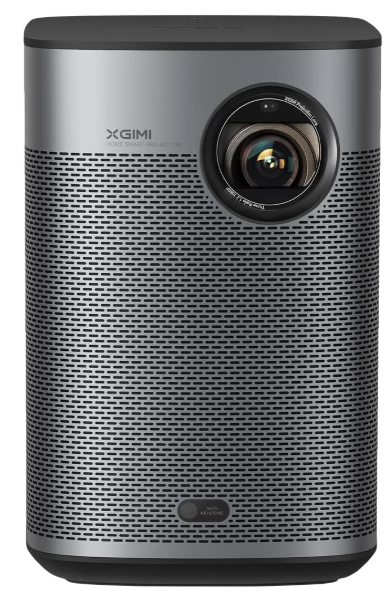
XGIMI Halo+ Portable Projector
Introduction
The XGIMI Halo+ Portable Projector is a premium, ultra-compact projector designed for entertainment on the go. Combining advanced engineering with a minimalist design, this projector delivers stunning 1080p Full HD visuals, powerful Harman Kardon audio, and a built-in 59.454Wh battery for up to 2.5 hours of uninterrupted playback. Whether you're hosting a backyard movie night, enjoying gaming sessions, or streaming your favorite shows during a camping trip, the XGIMI Halo+ Portable Projector offers hassle-free setup and immersive big-screen experiences anywhere.
Key selling points include intelligent screen adaptation, auto focus, and keystone correction, making it easy for anyone to set up and enjoy. The projector supports HDR10 and HLG for vibrant, lifelike colors, and features Android TV 10.0 for seamless access to thousands of streaming apps. With its lightweight build (1.6 kg / 3.5 lbs), the XGIMI Halo+ is ideal for travelers, families, and tech enthusiasts seeking a portable projector that doesn’t compromise on quality. The estimated price range is $800–$1,000, and it’s widely available through major electronics retailers and the official XGIMI website.
Specifications of the XGIMI Halo+ Portable Projector
- Resolution: 1920x1080 (1080p Full HD), supports 4K content downscaled to 1080p
- Brightness: 700 ISO Lumens (LED-powered)
- Display Technology: 0.33" DLP, 8-bit color processing
- Aspect Ratio: 16:9
- Image Size: 40.16"–200.10" (throw distance: 3.5'–17.4')
- Input Lag: 26.5ms (1080p/60), Game Mode ≤ 60ms
- Audio: Dual 5W Harman Kardon speakers, Dolby Audio, DTS-HD, DTS-Studio Sound
- Operating System: Android TV 10.0 (Google TV on newer models)
- Connectivity: HDMI (eARC), USB, Bluetooth 5.0, 2.4/5GHz Wi-Fi
- Battery: 59.454Wh, up to 2.5 hours of playtime
- Weight: 1.6 kg (3.5 lbs)
- Lamp Life: 25,000–30,000 hours
- Additional Features: Auto Focus, Auto Keystone Correction, Intelligent Screen Alignment, Intelligent Obstacle Avoidance, MEMC, HDR10, HLG, Full HD 3D
The XGIMI Halo+ outperforms most portable projectors in its class, offering superior brightness, audio quality, and smart features compared to competitors like the Anker Nebula Capsule and Epson EF-12.
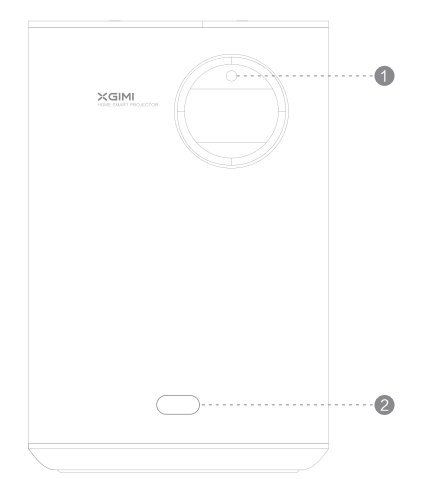
Front View
- Auto Focus ToF Part
- Auto Keystone Correction
Note: To prevent auto keystone correction failure, avoid blocking the sensor.
Button&inputView
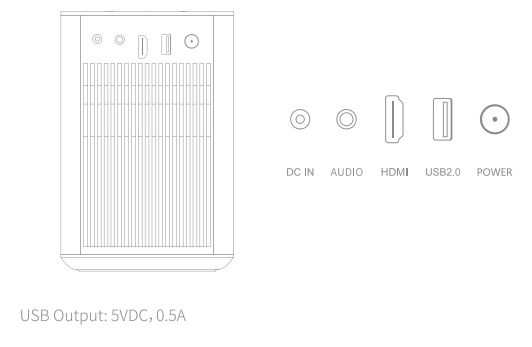
USB Output: SVDC, 0.SA
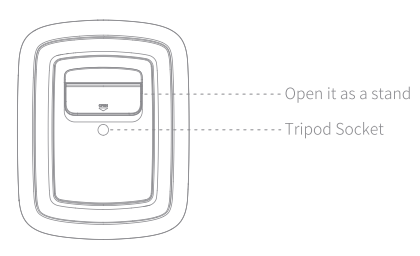
Bottom View
Remote View
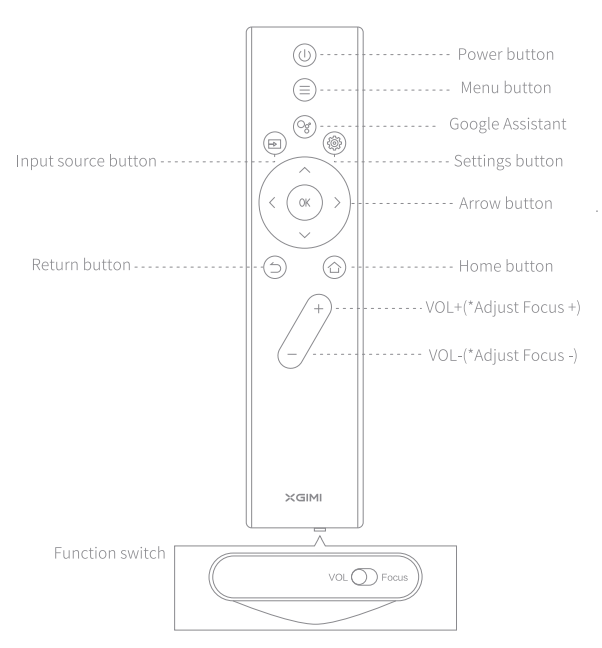
- To adjust the volume, switch to "VOL" first, as seen above. Then use the VOL+/- button to adjust.
- To adjust the focus, switch to "Focus" first, as seen above. Then use the VOL+/- button to adjust.
Getting Started
Device on/off
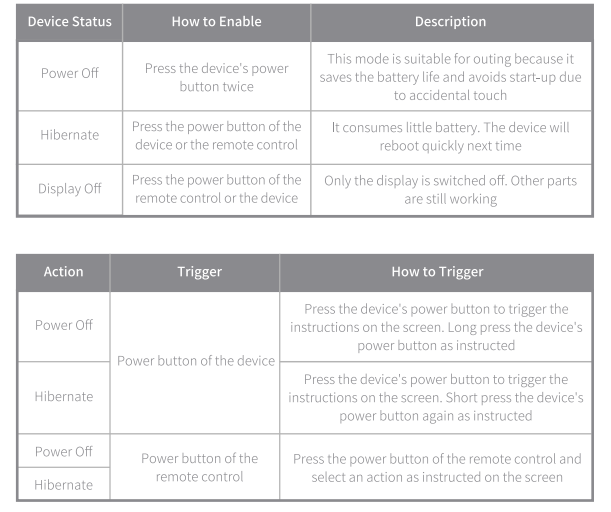
When you use the device for the first time, the mistouch prevention feature is enabled. Therefore, press the device's power button twice to power on the device. We recommend that you connect the device to the power source during its first use.
Device Status
Remote Control Pairing
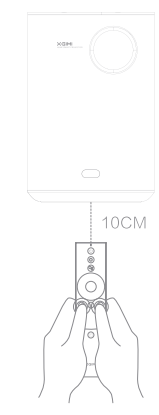
Position the remote control within 10 cm of the device. Press".png) ' simultaneously. An indicator light will begin flashing as the remote control enters pairing mode. Release the buttons when the flashing begins. After hearing a" ding" sound, the connection is successful.
' simultaneously. An indicator light will begin flashing as the remote control enters pairing mode. Release the buttons when the flashing begins. After hearing a" ding" sound, the connection is successful.
If pairing fails, wait for 30 seconds and repeat the steps above.
Charging Instruction
- The device should be charged with an official, standardized adaptor.
- Charging time will be lengthened for charging under the power-on state.
- If you plug into an adapter under the powered-off state, a blinking red indicator light represents charging, while the green indicator light represents that the battery is fully charged. (The green indicator light will extinguish after it is on for 10 seconds.)
- If your device will remain unused for long periods of time, the device should be fully charged. Select the Power Off mode when you switch off the device. (In this mode, the mistouch prevention feature is enabled. The power consumption is low, and the device cannot be powered on by using a remote control. Users can only press the device's power button twice to power on the device. Alternatively, you can connect the device to the adapter, and the mistouch prevention feature is disabled by default. Then, you can simply press the power button once to power on the device.) Moreover, charge the device once every 3 months to avoid irreversible capacity loss or damage arising from a low battery. This is because the battery will self-discharge during the excessively long storage time.
Troubleshooting Common Issues with the XGIMI Halo+ Portable Projector
- Image is blurry: Use the manual focus ring or enable Auto Focus.
- Projector won’t turn on: Check the power adapter and battery charge.
- No sound: Verify speaker settings and Bluetooth connections.
- Wi-Fi connection issues: Restart the projector and router, or reset network settings.
- Overheating: Ensure proper ventilation and avoid prolonged use in hot environments.
Preventive measures include regular cleaning of the lens and vents, updating firmware, and using the projector in a well-ventilated area. The XGIMI Halo+ comes with a 1-year limited warranty. For support, visit the official XGIMI website or contact customer service.
Pros and Cons of the XGIMI Halo+ Portable Projector
Pros
- Excellent 1080p image quality with HDR10 and HLG support
- Premium Harman Kardon speakers with Dolby and DTS audio
- Advanced auto-adjustment features for easy setup
- Long battery life and lightweight design for portability
- Android TV 10.0 for access to thousands of apps
Cons
- Battery life may be shorter with high brightness settings
- Higher price point compared to basic portable projectors
- Limited storage (16GB) for offline content
The XGIMI Halo+ offers outstanding value for money, especially for users seeking a portable projector with top-tier audio and smart features.
Customer Reviews of the XGIMI Halo+ Portable Projector
The XGIMI Halo+ Portable Projector has received overwhelmingly positive feedback, with an average rating of 4.7/5 stars. Users praise its sharp image quality, powerful sound, and ease of setup. Many highlight the projector’s portability and battery life as major advantages. Common complaints include the relatively high price and occasional Wi-Fi connectivity issues. Customers recommend the XGIMI Halo+ for outdoor movie nights, gaming, and travel. Frequent mentions include the projector’s ability to deliver a true cinematic experience and its robust build quality.
Faqs
How do I set up the xgimi Halo+ Portable Projector for the first time?
What should I do if the xgimi Halo+ Portable Projector image is blurry or not focused correctly?
Can I use the xgimi Halo+ Portable Projector with gaming consoles and what is its input lag?
How long does the battery last on the xgimi Halo+ Portable Projector and can it be used while charging?
What audio features does the xgimi Halo+ Portable Projector offer for a cinematic experience?
How do I maintain and clean the xgimi Halo+ Portable Projector to ensure optimal performance?
What devices and streaming apps are compatible with the xgimi Halo+ Portable Projector?
How does the xgimi Halo+ Portable Projector handle different lighting conditions and projection surfaces?
More xgimi manuals
- Setup: Xgimi Aura 4K Ultra Short Throw Laser Projector User Manual
- Setup: Xgimi Horizon & Horizon Pro Projector User Manual
- Setup: Xgimi MoGo Pro+ Portable Projector User Manual
- Setup: Xgimi Horizon Ultra Home Projector User Manual
- Setup: Xgimi MoGo 2 Pro Projector User Manual
- Setup: Xgimi Elfin Portable Projector Instruction Guide
Leave a Comment