
Setup: Xgimi MoGo Pro+ Portable Projector User Manual
Content
XGIMI MoGo Pro+ Portable Projector
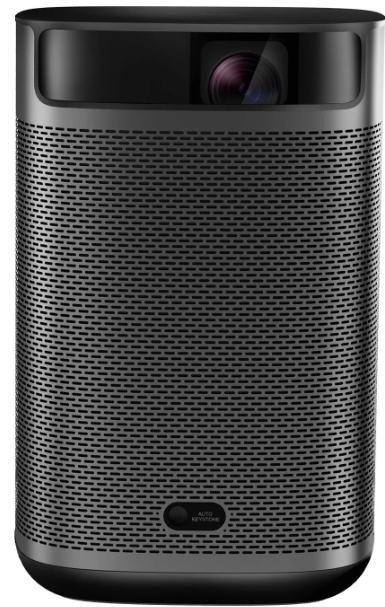
Introduction to the XGIMI MoGo Pro+ Portable Projector
The XGIMI MoGo Pro+ portable projector represents a breakthrough in compact home entertainment technology, delivering native 1080p Full HD resolution in a lightweight, battery-powered package. This innovative portable projector weighs just 2.0 pounds and measures 3.72" x 4.15" x 5.75", making it the ideal solution for anyone seeking big-screen entertainment without the bulk of traditional projectors. Whether you're hosting outdoor movie nights, camping adventures, or enhancing your home theater setup, the MoGo Pro+ combines portability with professional-grade performance.
Designed for modern consumers who demand flexibility and quality, the XGIMI MoGo Pro+ portable projector features 300 ANSI lumens of brightness paired with advanced auto keystone correction technology. This means you can project crystal-clear images up to 200 inches on any surface, from any angle, without manual adjustment. The projector's dual Harman Kardon speakers deliver balanced, immersive audio, while the integrated 12,400 mAh battery provides up to 4 hours of continuous playback.
The target audience for this portable projector includes tech enthusiasts, outdoor entertainment lovers, business professionals requiring mobile presentation solutions, and families wanting flexible viewing options. With Android TV 9.0 integration and access to 5,000+ apps,,s including Netflix, YouTube, and HBO, the MoGo Pro+ serves as a complete entertainment system. The device typically retails between $400-$600 USD and is widely available through major retailers,, ers including Best Buy, Amazon, and the official XGIMI website. Its combination of portability, image quality, and smart features makes it one of the best portable projectors in its class.
Technical Specifications of the XGIMI MoGo Pro+ Portable Projector
Display & Image Quality
- Native Resolution: 1920 x 1080 pixels (Full HD 1080p)
- Display Technology: 0.23" DLP (Digital Light Processing) with DMD chip
- Brightness: 300 ANSI lumens
- Aspect Ratio: 16:9 HD
- Color Processing: 8-bit
- 3D Support: Frame Packing & Side by Side formats
- Projection Range: 40" - 200" screen size
- Throw Ratio: 1.2:1
- Throw Distance: 2.6' - 8.8' for optimal projection
- LED Lamp Life: 30,000 hours
Audio & Sound System
- Speaker Configuration: Dual Harman Kardon speakers
- Speaker Power: 3.0 Watts × 2
- Audio Output: Mini Jack connection available
Processing & Storage
- Operating System: Android TV 9.0
- RAM: 2GB
- Internal Storage: 16GB
- Available Apps: 5,000+ through Google Play Store
Physical Specifications & Power
- Dimensions: 3.72" x 4.15" x 5.75" (H x W x D)
- Weight: 2.0 pounds (0.9kg)
- Battery Capacity: 12,400 mAh
- Battery Life: Up to 4 hours continuous playback
- Power Consumption: 65 Watts
- Power Input: 100V - 240V universal voltage
- Audible Noise: 30 dB (quiet operation)
Connectivity & Wireless Features
- HDMI: Full-size HDMI port
- USB: Full-size USB port
- Chromecast: Built-in Chromecast support
- Airscreen: Mirroring Display capability
- Google Assistant: Voice control integration
- Wireless Networking: Built-in WiFi
Focus & Keystone Correction
- Focus Type: TOF Laser Auto Focus
- Keystone Correction: Automatic Vertical & Horizontal
- Projection Method: Front, Rear, Front Ceiling, Rear Ceiling
Step-by-Step Setup Guide for the XGIMI MoGo Pro+ Portable Projector
- Initial Unboxing & Preparation
Upon receiving your XGIMI MoGo Pro+ portable projector, carefully remove all components from the packaging. The box should contain the projector unit, power adapter, USB cable, HDMI cable, carrying case, and user documentation. Inspect the projector for any visible damage before proceeding. Allow the device to acclimate to room temperature for 15 minutes if shipped in cold conditions. - Battery Charging & Power Setup
Before first use, fully charge the integrated 12,400 mAh battery using the provided power adapter. Connect the adapter to the charging port on the projector's rear panel and plug it into a standard electrical outlet. Charging typically takes 2-3 hours. An LED indicator will display red while charging and turn green when fully charged. The projector can operate for up to 4 hours on a single charge, providing excellent portability for extended viewing sessions. - Positioning & Installation
Place the MoGo Pro+ on a stable, level surface or use the integrated stand for flexible positioning. The 1.2:1 throw ratio allows projection from 2.6 to 8.8 feet away, producing screen sizes from 40" to 200".[1][2] Position the projector perpendicular to your projection surface for optimal image quality. The device's lightweight design (2.0 pounds) makes mounting on tripods or ceiling brackets straightforward. - Initial Power-On & Configuration
Press the power button located on the projector's top panel to activate the device. During the first startup, the MoGo Pro+ will launch its setup wizard. Select your preferred language and connect to your WiFi network using the remote control or on-screen keyboard. Sign in with your Google account to access the full Google Play Store and enable voice control features through Google Assistant. - Focus & Keystone Adjustment
Once powered on, the projector's TOF Laser Auto Focus will automatically adjust for optimal image clarity. The automatic keystone correction feature eliminates the need for manual image adjustment—simply aim the projector at your screen, and the technology will correct distortion from any angle within seconds.[3] If manual adjustment is needed, access the settings menu and select keystone correction for fine-tuning. - Wireless Connectivity & Content Access
With WiFi connected, access content through the Android TV 9.0 interface. Download your preferred apps, ps including Netflix, YouTube, HBO, and Showtime, from the Google Play Store. Use Chromecast functionality to mirror content from your smartphone, tablet, or laptop wirelessly. For gaming or presentations, connect via HDMI or USB ports for direct input. The projector supports multiple projection methods, including front, rear, front ceiling, and rear ceiling configurations. - Audio Configuration & Harman Kardon Speakers
The dual Harman Kardon speakers automatically activate when content begins playing. Adjust volume using the remote control or on-screen menu. For enhanced audio, connect external speakers via the mini jack output port. The 6-watt total speaker power (3W × 2) delivers balanced sound suitable for movies, gaming, and presentations without additional equipment. - Safety Precautions & Operating Warnings
Never look directly into the projector lens during operation, as the DLP light source can cause eye damage. Maintain adequate ventilation around the device—do not cover air vents during use. Keep the projector away from water and extreme temperatures (operating range: 0°C to 40°C). Allow the device to cool for 10 minutes before powering off after extended use. Store the projector in the included carrying case when not in use for protection during transport.
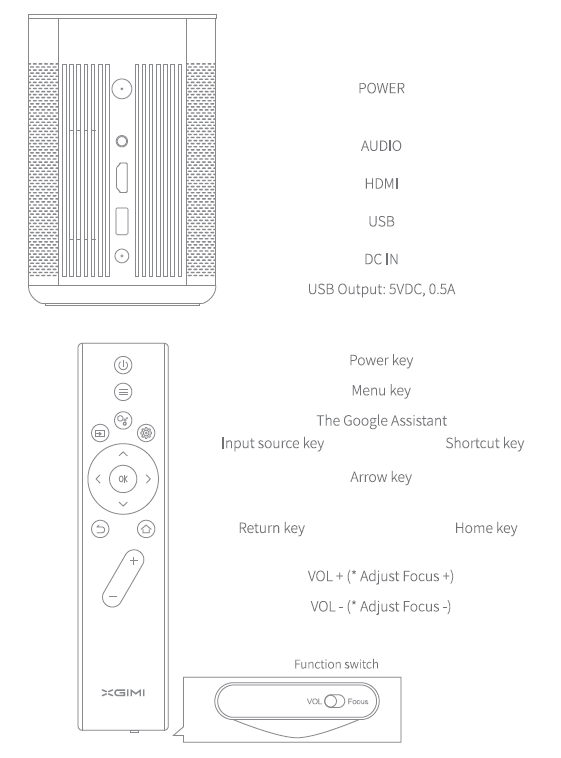
- Volume is adjusted through the add-subtract key when the function switch is moved to the left (VOL).
- Focus is adjusted through the add-subtract key when the function switch is moved to the right (Focus).
Device on / off
- When the device is off, press and hold the key"
 "for 2 seconds to turn on the device.
 - When the device is on, press and hold the key" "for 5 seconds to turn off the device.
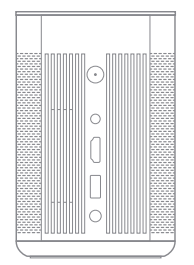
Remote control pairing
Place the remote control within 10cm of the device, press"  "simultaneously, and an indicator light will begin flashing as the remote control enters pairing mode. Buttons can be released as soon as flashing begins, and the connection is successful when a "Ding" is heard.)
If pairing fails, after 30 seconds, repeat the above charging instructions device should be charged with an official, standardised adaptor.
- Charging time will be lengthened for charging under power in the state.
- Plug into the adapter under the off state, and the blinking red indicator light represents charging, while the green indicator light (green indicator light will extinguish after it is on for 10s) represents that the battery is fully charged.
- In the case of long-term non-use of the device, the device should be fully charged first. The power key of the device should be pressed for Ss to enter battery protection mode (the device cannot be started through the remote control under this mode) without plugging into the power cable. And the device shall be charged once every 3 months to avoid irreversible capacity loss or damage arising from a low battery caused due to the self-discharge of the battery after excessively long storage time.
Troubleshooting Common Issues with the XGIMI MoGo Pro+ Portable Projector
Image Quality Problems
- Blurry or Out-of-Focus Image: The MoGo Pro+ features automatic TOF Laser Auto Focus, which should activate immediately upon startup. If the image remains blurry, manually access the focus settings through the menu and adjust incrementally. Ensure the projector is positioned at the correct throw distance (2.6' - 8.8' for optimal results). Clean the lens with a soft, dry cloth to remove dust or debris that may cause image degradation.
- Distorted or Uneven Projection: The automatic keystone correction should resolve most distortion issues within seconds of startup. If distortion persists, verify that the projector is positioned perpendicular to the projection surface. Access the keystone correction menu and manually adjust both vertical and horizontal settings. Ensure the projection surface is flat and smooth for the best results.
- Dim or Faded Image: With 300 ANSI lumens of brightness, the MoGo Pro+ performs well in darkened environments. In brightly lit spaces, reduce ambient lighting or project onto a white, matte surface. The LED lamp maintains consistent brightness for 30,000 hours; if dimming occurs, check that air vents are not obstructed and the device is operating within the recommended temperature range (0°C to 40°C). A dimmer image may also indicate battery power is low—charge the device fully for maximum brightness.
Connectivity & Wireless Issues
- WiFi Connection Failures: Restart the projector and your WiFi router. Move closer to the router to ensure a strong signal strength. Access Settings > Network and manually re-enter your WiFi credentials. If the problem persists, perform a factory reset through the Settings menu (note: this will erase all data and downloaded apps).
- Chromecast Mirroring Not Working: Ensure your smartphone or tablet is connected to the same WiFi network as the projector. Update your device's Chromecast app to the latest version. Restart both the projector and your casting device. If issues continue, disable and re-enable Chromecast through the projector's settings menu.
Audio Problems
- No Sound Output: Verify volume is not muted through the remote control or on-screen menu. Check that the content being played has audio (some streaming services may have audio disabled). Restart the application or content source. If using external speakers via the mini jack port, ensure the cable is fully inserted and the external device is powered on.
Power & Battery Issues
- Battery Not Charging: Use only the official XGIMI power adapter provided with the projector. Inspect the charging port for debris or damage. Allow 2-3 hours for a complete charge. If the device does not charge after this period, contact XGIMI customer support with your serial number.
- Short Battery Life: Battery performance diminishes with age and usage. The 12,400 mAh battery typically provides 4 hours of playback under standard conditions. Reduce brightness settings to extend battery life. Close background applications and disable WiFi when not needed. If battery life drops significantly below 2 hours, consider professional battery replacement through XGIMI.
Warranty & Support Options
- XGIMI provides standard manufacturer warranty coverage on all components. Most issues can be resolved through the troubleshooting steps outlined above. For persistent problems, contact XGIMI customer support through their official website (us.xgimi.com) or authorized retailers. Provide your projector's serial number, proof of purchase, and a detailed description of the issue. Professional support is available via email, phone, and live chat during business hours.
Pros & Cons of the XGIMI MoGo Pro+ Portable Projector
Advantages
- Exceptional Portability: At just 2.0 pounds with an integrated carrying handle, the MoGo Pro+ is one of the most portable projectors available. Its compact dimensions (3.72" x 4.15" x 5.75") fit easily into bags for travel, camping, or outdoor entertainment.
- Integrated Battery: The 12,400 mAh battery provides up to 4 hours of continuous use without external power sources, enabling true wireless operation anywhere.
- Automatic Focus & Keystone: TOF Laser Auto Focus and automatic keystone correction eliminate setup complexity—users can project from any angle and achieve rectangular images instantly without manual adjustment.
- Quality Audio: Dual Harman Kardon speakers deliver balanced, well-rounded sound superior to typical portable projector audio systems. The 6-watt total power (3W × 2) satisfies most viewing scenarios without additional speakers.
- Smart TV Integration: Android TV 9.0 with access to 5,000+ apps, Google Play Store, and voice control through Google Assistant makes this projector a complete entertainment system without additional devices.
- Versatile Projection Sizes: The 1.2:1 throw ratio supports screen sizes from 40" to 200", accommodating various room sizes and viewing preferences.
- Extended Lamp Life: The LED light source provides 30,000 hours of operation—equivalent to watching 4 movies daily for 10+ years—ensuring long-term reliability.
- Multiple Connectivity Options: HDMI, USB, Chromecast, and Airscreen support provide flexible content input from various devices, including laptops, gaming consoles, and smartphones.
Disadvantages
- Moderate Brightness: At 300 ANSI lumens, the MoGo Pro+ performs best in darkened environments. In well-lit rooms, image quality diminishes significantly compared to higher-lumen projectors. Similar XGIMI models like the Halo+ offer 700 ISO lumens, making them better for daytime use.
- No 4K Resolution: The native 1080p resolution may disappoint users seeking ultra-high-definition projection. Competitors like the Halo+ support 4K video formats for future-proofing.
- Limited Processing Power: With 2GB RAM and 16GB storage, the device may struggle with demanding applications or large app libraries. Storage fills quickly after downloading multiple streaming apps.
- No Advanced Image Engine: The MoGo Pro+ lacks the X-VUE 2.0 Image Engine found on higher-end XGIMI models, resulting in less enhanced color depth and clarity compared to premium alternatives.
- Battery Dependency: While the 4-hour battery is convenient, extended viewing requires regular charging. Battery degradation over time will reduce operational duration.
- Speaker Volume Limitations: While quality is good, the 6-watt total speaker output may prove insufficient for large outdoor spaces or presentations requiring significant amplification.
- Fixed Lens Design: The projector cannot accommodate optional lenses, limiting flexibility for specialized projection applications or throw distance adjustments beyond the 1.2:1 ratio.
Value for Money Assessment
The XGIMI MoGo Pro+ portable projector offers excellent value in the $400-$600 price range, particularly for users prioritizing portability and convenience. The combination of 1080p resolution, integrated battery, smart TV features, and quality audio justifies the investment for travel-focused consumers. However, users requiring high brightness for well-lit spaces or 4K support should consider investing in higher-tier models like the Halo+, which offers superior specifications at a higher price point.
Customer Reviews & Real-World Feedback on the XGIMI MoGo Pro+ Portable Projector
Overall User Satisfaction
- The XGIMI MoGo Pro+ portable projector consistently receives positive reviews from customers who value portability and ease of use. Users frequently praise the automatic focus and keystone correction features, which significantly reduce setup time compared to traditional projectors. The Harman Kardon dual speakers receive particular commendation for delivering balanced, high-quality audio without requiring external sound systems.
Common Praise Points
- Customers highlight the projector's exceptional portability, with many noting the lightweight design makes it ideal for camping trips, outdoor movie nights, and travel. The integrated battery functionality eliminates dependency on power outlets, a major advantage for outdoor entertainment. The 1080p image quality receives consistent positive feedback when used in darkened environments, with users appreciating the crisp, clear projection up to 200 inches. Integration with Android TV and Google Play Store access allows seamless streaming of Netflix, YouTube, and other popular services without additional devices.
Frequently Mentioned Concerns
- The primary complaint centers on the 300 ANSI lumens brightness limitation in well-lit spaces. Users attempting daytime projection or use in bright rooms report significant image dimming that compromises viewing quality. Some customers express disappointment about the lack of 4K support, particularly those with newer 4K content libraries. Battery life concerns emerge from power users seeking continuous operation beyond 4 hours; extended viewing requires recharging between sessions. Storage limitations (16GB) become apparent after downloading multiple streaming applications.
Star Ratings & Recommendations
- Most retailers report the MoGo Pro+ averaging 4-4.5 out of 5 stars across customer reviews. It is most strongly recommended for travelers, campers, and outdoor entertainment enthusiasts who prioritize portability over maximum brightness. The projector suits small to medium-sized rooms and outdoor spaces with controlled lighting. Customers seeking high-brightness performance for well-lit environments or 4K capabilities are advised to explore alternative models within XGIMI's product lineup.
Addressing Key Purchase Considerations
- Prospective buyers should verify that their primary use case aligns with the projector's strengths in portability and darkened environment performance. For outdoor movie nights and travel applications, the MoGo Pro+ delivers exceptional value. For home theater setups with bright lighting or 4K content requirements, higher-tier alternatives warrant consideration. The included carrying case and reliable battery make this portable projector an excellent choice for users who value flexibility and convenience in their entertainment setup.
```
Tags
More xgimi manuals
- Setup: Xgimi Horizon & Horizon Pro Projector User Manual
- Setup: Xgimi Horizon Ultra Home Projector User Manual
- Setup: Xgimi Halo+ Portable Projector User Manual
- Setup: Xgimi MoGo 2 Pro Projector User Manual
- Setup: Xgimi Aura 4K Ultra Short Throw Laser Projector User Manual
- Setup: Xgimi Elfin Portable Projector Instruction Guide
Leave a Comment