
Setup: Xgimi Horizon Pro Projectors User Manual
Content
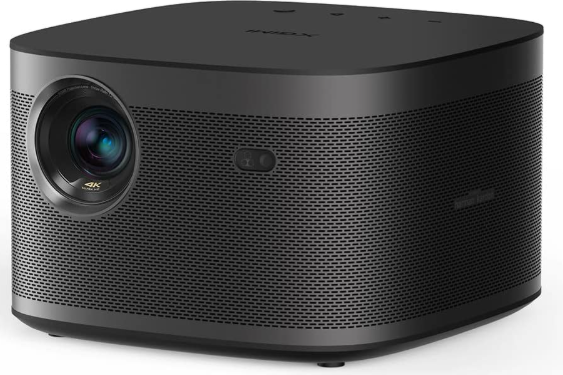
XGIMI Horizon Pro Projectors
Introduction
Transform any room into a cinematic experience with the XGIMI Horizon Pro projector, a leading 4K smart projector designed for movie lovers, gamers, and families seeking big-screen immersion. This plug-and-play home theater projector delivers true 4K resolution (3840 × 2160 pixels), 8.3 million pixels, and a bright 1500 ISO lumens LED light source—ensuring vivid, sharp images even in well-lit environments.
What sets the XGIMI Horizon Pro apart is its suite of intelligent features, including auto keystone correction, autofocus, intelligent screen alignment, and obstacle avoidance. These advanced technologies automatically adjust the image for a perfect fit, remove geometric distortions, and even avoid physical obstacles in your viewing area—making setup effortless and hassle-free. The built-in Android TV 10.0 platform brings access to thousands of apps, streaming services, and built-in Chromecast and AirScreen for seamless content casting from your devices.
Enjoy premium audio from dual 8W Harman Kardon speakers, with DTS-HD and Dolby support for immersive, theater-quality sound. The Horizon Pro is compact, portable, and designed for flexibility—projecting up to a 200-inch image and supporting vertical/horizontal keystone correction up to ±40 degrees.
The XGIMI Horizon Pro projector is ideal for home theater enthusiasts, gamers, and anyone who wants a versatile, user-friendly projector for movies, sports, gaming, or presentations. It is available at major electronics retailers and online stores, with an estimated price range of $1,500–$1,800, reflecting its premium features and performance.
Technical Specifications
- Display: True 4K UHD (3840 × 2160), DLP technology, 8.3 million pixels
- Brightness: 1500 ISO lumens LED light source—bright enough for daytime use
- Contrast Ratio: Not officially specified, but high for vibrant, realistic colors
- Throw Distance: Projects up to 200 inches, suitable for various room sizes
- Keystone Correction: Auto keystone (±40° vertical/horizontal), intelligent screen alignment, obstacle avoidance
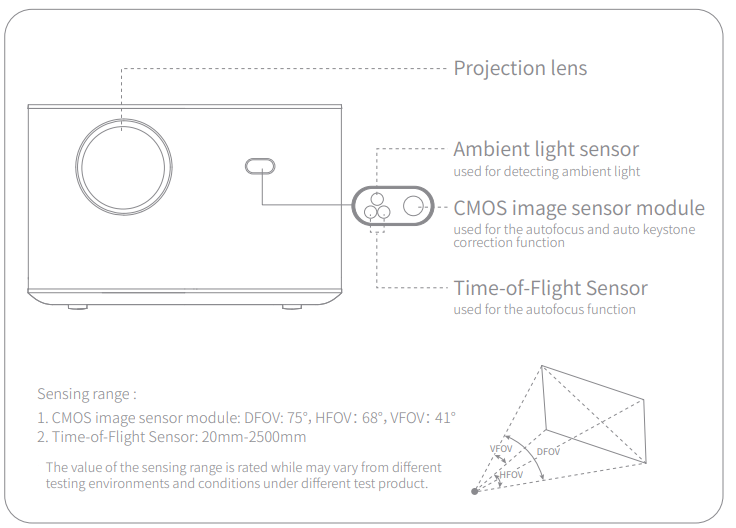
- Focus: Autofocus for always-crisp images
- Sound: Dual 8W Harman Kardon speakers, DTS-HD & Dolby support, Bluetooth 5.0 for wireless audio
- Smart Features: Android TV 10.0, Chromecast, AirScreen, WiFi (dual-band 2.4/5GHz), Ethernet
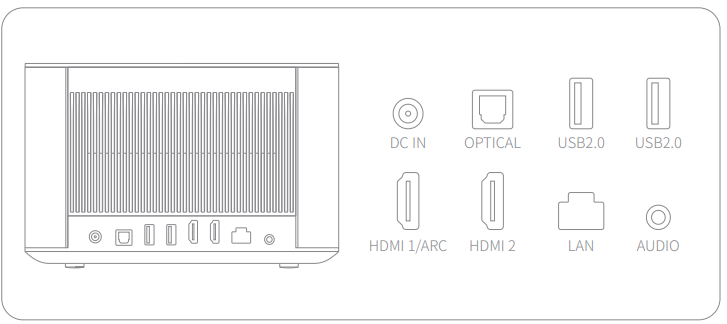
- Ports: 2x HDMI (4K @ 60Hz, one with eARC), 2x USB, LAN, optical audio, 3.5mm headphone
- Dimensions & Weight: 8.1 x 8.5 x 5.3 in (20.57 x 21.59 x 13.46 cm), 6.3 lbs (2.86 kg)—portable and compact
- Other: Game Mode Boost, dual-band WiFi, Bluetooth 5.0, intelligent ambient light sensing
Compared to similar 4K projectors, the XGIMI Horizon Pro stands out for its combination of smart features, automated setup, and built-in premium audio—making it a strong competitor to models from Epson, BenQ, and Optoma in its price range.
Front view
Rear view
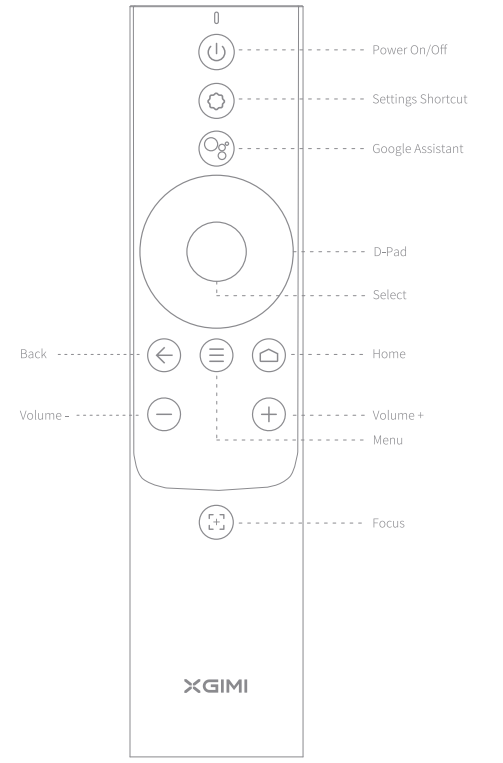
Google Assistant
Talk to Google to control your TV using your voice.
Press the Google Assistant button on your remote to search for movies and shows, get recommendations to match your mood, get answers, control smart home devices, and more.
Bluetooth speaker
- Use mobile Bluetooth settings to search for "XGIMI HORIZON PRO" or "XGlMl HORIZON" to pair with the device and play songs.
- If you need to turn off the projection frame during music playback, you can press the "Power" button and select "Display Off".
More settings
At any interface, you can press the "O" button on the remote control to quickly set your device. To configure more settings, go to the "All Settings" page.
The main settings are described as follows:
- Brightness and color
Select a brightness mode, such as standard, bright, or eye-protection, and adjust the brightness level.
If the "Environmental Adaptation" function is enabled, the device can automatically adjust the brightness based on the ambient brightness. - Image mode
Select different image modes in different scenarios, such as movie, football, office, and game, to adjust the image parameters of the video or signal source. The low-latency option is available in game mode. - Sound effect
Select different sound effects in different scenarios, such as movies, music, and sports, to enjoy the optimal sound experience. - Focus calibration
If the automatic focus adjustment function is not as good as before after long-term use, you can tune the automatic focus adjustment function through "Focus Calibration".
Note: When calibrating, make sure that the device is in the front projection state and that it is 1 to 2 meters away from the wall or screen. - Keystone calibration
If you are not satisfied with the effect of the automatic keystone correction function, you can recalibrate the automatic keystone correction function through "Keystone Calibration".
Note: When calibrating, make sure that the device is in the front projection state and that it is 1 to 2 meters away from the wall or screen. - Gyro calibration
If the automatic keystone correction function is not as good as before after long-term use, you can recalibrate the gyro through "Gyro Calibration" to optimize the effect of automatic keystone correction.
Note: Make sure that the device is placed horizontally during calibration.
Online upgrade
- Check the latest version and upgrade the system through "Settings" -> "Device Preferences"-> "About"-> "System Update".
Chromecast Built-in™
Chromecast built-in
- Easily cast your favorite movies, music, and more to your TV with Chromecast built in.
- Simply tap the Cast button from apps you already know and love to stream entertainment from your phone, tablet, or laptop to the TV. While you're streaming, you can keep using your phone for other things- scroll through social media, send a text, and even accept calls.
Important Precautions
Correct use of the device:
- Do not face the lens into the eyes because the strong projector light may cause injury to the eyes.
- Do not block the air inlet/outlet of the device to avoid damage to internal electronic devices arising from normal heat dissipation failure of the device.
- Do not wipe the lens directly with cleaning tools, including paper and cloth, to avoid damage to the lens. Please clean up the dust on the lens surface by blowing clean air.
- Do not wash the device with chemicals, detergents, or any liquid to prevent the circuit board from being corroded by rainwater, moisture, and mineral-containing liquids.
- Keep the device and its components and accessories out of reach of children.
- Make sure that the device is used in a dry and ventilated environment.
- Do not store the device in overheated or overcooled places, because extreme temperatures will shorten the life of electronic devices. Place and use the device in an environment of 0 °C- 40 °C.
- Do not put the device into any heating equipment (such as a dryer or microwave oven) for drying.
- Do not firmly extrude the device or place barriers on it or its back to avoid damage to the device.
- Do not throw, strike, or sharply vibrate the device to avoid damage to the internal circuit board.
- Do not try to disassemble and assemble the device yourself. If any issue occurs, please contact the after-sales service of XGIMI.
- Do not repair any product on your own. If the device or any component cannot work properly, consult the after-sales service of XGlMI in a timely manner or return it to the factory for repair.
Troubleshooting
- How do I install apps?
- XGIMI supports Android TV with the native Google Play Store. You can install apps from Google Play.
- Install apps from your U disk or other external storage devices. For the first installation, you need to agree to install unknown apps from File Manager and UI Configuration.
- Why does the outer frame leave an irregular shadow after keystone correction?
TI DLP projections cannot fill the whole screen. The true resolution fills only the actual display area and leaves the surrounding area unused. After a keystone correction is complete, some of the display area will become shadow (unused) because XGIMI projectors use digital correction. Therefore, it is normal to have some shadow in the background of the picture. - Is it normal that the adapter gets warm after it is inserted into the projector?
Our adapters are tested and certified by security regulations. Normally, the electric power transmission can cause heat or a small friction sound, which should not be a concern. - What can I do when there is no picture or when the sound and picture are not in sync?
For wireless projections, this issue may occur due to the app performance or the Internet speed.
If the projector is connected to an HDMI or Bluetooth speaker, this issue may occur due to the brand and compatibility issues of the connected device. - What can I do if the focusing function does not work properly?
To resolve this issue, verify the following conditions:- The auto-focusing function is turned on in the focus settings.
- No object is in front of the projection lens or the sensor module.
If this issue persists, open "System Settings" to perform focus calibration.
- What is the support period for device software updates?
According to the regulations of Android TV, this product will support software updates for at least 3 years. - How to delete the device and personal data?
- Delete the account in "Settings" -> "Accounts and Sign In" , select your account, and then select "Remove account".
- Perform a factory reset of the device in "Settings"->"Device preferences"->" About"->" Factory reset", and the device data will be removed.
If you still have questions, please contact service@xgimi.com.
Warranty & Support: XGIMI offers a standard warranty (check local retailer for duration). For support, visit the official XGIMI website or contact customer service via email or phone. Always keep your purchase receipt for warranty claims.
Pros & Cons: Balanced Assessment of XGIMI Horizon Pro Projectors
Pros
- Superior 4K Picture Quality: Crisp, vibrant images with excellent color accuracy, even in brighter rooms.
- Automated Setup: Autofocus, auto keystone, intelligent screen alignment, and obstacle avoidance make installation effortless.
- Powerful Built-in Audio: Dual Harman Kardon speakers deliver immersive, theater-quality sound—rare in projectors.
- Smart TV Platform: Android TV 10.0 with access to streaming apps, Chromecast, and AirScreen].
- Portable Design: Compact and lightweight for easy transport between rooms or locations.
- Flexible Connectivity: Multiple HDMI, USB, LAN, and audio ports for versatile setups.
Cons
- Premium Price: Higher cost compared to budget 1080p projectors, though competitive within the 4K segment.
- Brightness Limitations: While bright for LED projectors, they may not match the peak brightness of some lamp-based models in very sunny rooms.
- Built-in Storage: Limited internal storage for apps; expandable via USB, but not as convenient as built-in options.
- Fan Noise: Some users note audible fan noise at higher brightness settings, though this is common in compact projectors.
The XGIMI Horizon Pro projector offers exceptional value for those seeking a premium, user-friendly 4K home theater experience with minimal setup hassle and outstanding audio-visual performance.
Customer Reviews and Real-World Feedback
User feedback for the XGIMI Horizon Pro projector is overwhelmingly positive, with many praising its picture quality, ease of use, and built-in sound system. Reviewers highlight the projector’s ability to deliver sharp, colorful 4K images even in rooms with ambient light, and the convenience of automated setup features. The Harman Kardon speakers are frequently mentioned as a standout feature, providing rich, balanced audio that surpasses most built-in projector speakers.
Common praises include the intuitive Android TV interface, compact design, and reliable performance for both movies and gaming. Some users note the projector’s fan can be audible at maximum brightness, and a few mention the premium price as a consideration. Most agree that the XGIMI Horizon Pro is an excellent choice for home theater enthusiasts who want a hassle-free, high-quality viewing experience.
Based on aggregated reviews, the XGIMI Horizon Pro typically earns 4.5 out of 5 stars, with users recommending it for its combination of smart features, picture quality, and audio performance. If you value convenience, immersive visuals, and premium sound in a compact package, the XGIMI Horizon Pro projector is a top contender in its class.
Tags
More xgimi manuals
- Setup: Xgimi Elfin Portable Projector Instruction Guide
- Setup: Xgimi MoGo 2 Pro Projector User Manual
- Setup: Xgimi Horizon Ultra Home Projector User Manual
- Setup: Xgimi MoGo Pro+ Portable Projector User Manual
- Setup: Xgimi Horizon & Horizon Pro Projector User Manual
- Setup: Xgimi Halo+ Portable Projector User Manual
Leave a Comment